本文最后更新于 2026年3月25日 晚上
页脚网页预览量接口 页脚网页预览量接口需求 需要两个接口分别为
siteInfo(获取网站统计信息(总访问量、总访客数、文章数、分类数、标签数))
根据用户预览网页次数增加预览量
累计独立访客数,通过 IP 或设备标识去重统计
对同一个ip的访问进行限制(一分钟不能超过30次),避免将redis撑爆
其他统计数据从对应表中实时查询
采取先记录到redis里然后每10分钟更新至数据库
recordVisit(记录访问日志(统计PV和UV))
记录用户访问日志(用于统计访问量和访客数)
日志中记录访问的页面URL,页面标题,来源页面
通过请求头获取 IP、User-Agent 等信息
使用 IP + User-Agent 组合判断是否为新访客(24小时内去重)
注意记录ip时不能直接建用户的原始ip明文入库,这样在大多数情况下是违法的,要对用户访问的IP进行脱敏处理
这样即避免了违法,又可以保证数据库被入侵时不至于将所有访问过的用户ip暴露出去,维护了用户的信息安全
采取先记录到redis里然后每5分钟更新至数据库
访客量去重处理,每个月记录新访客量
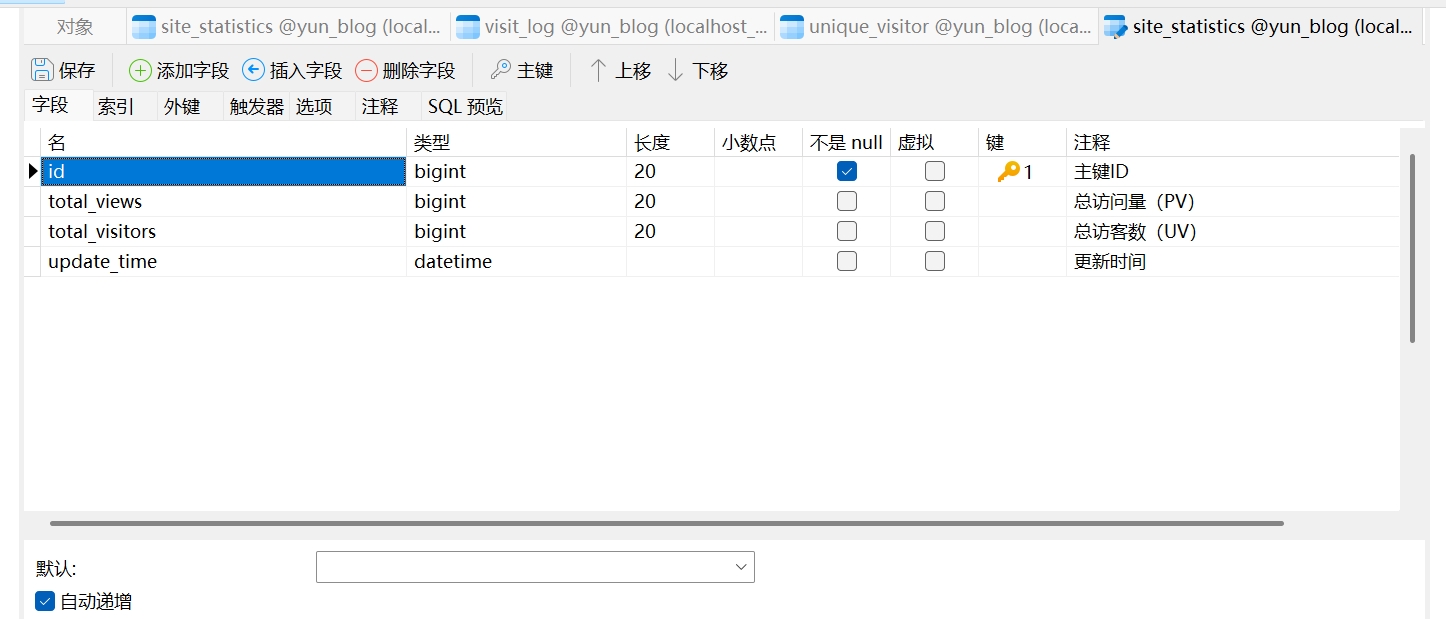
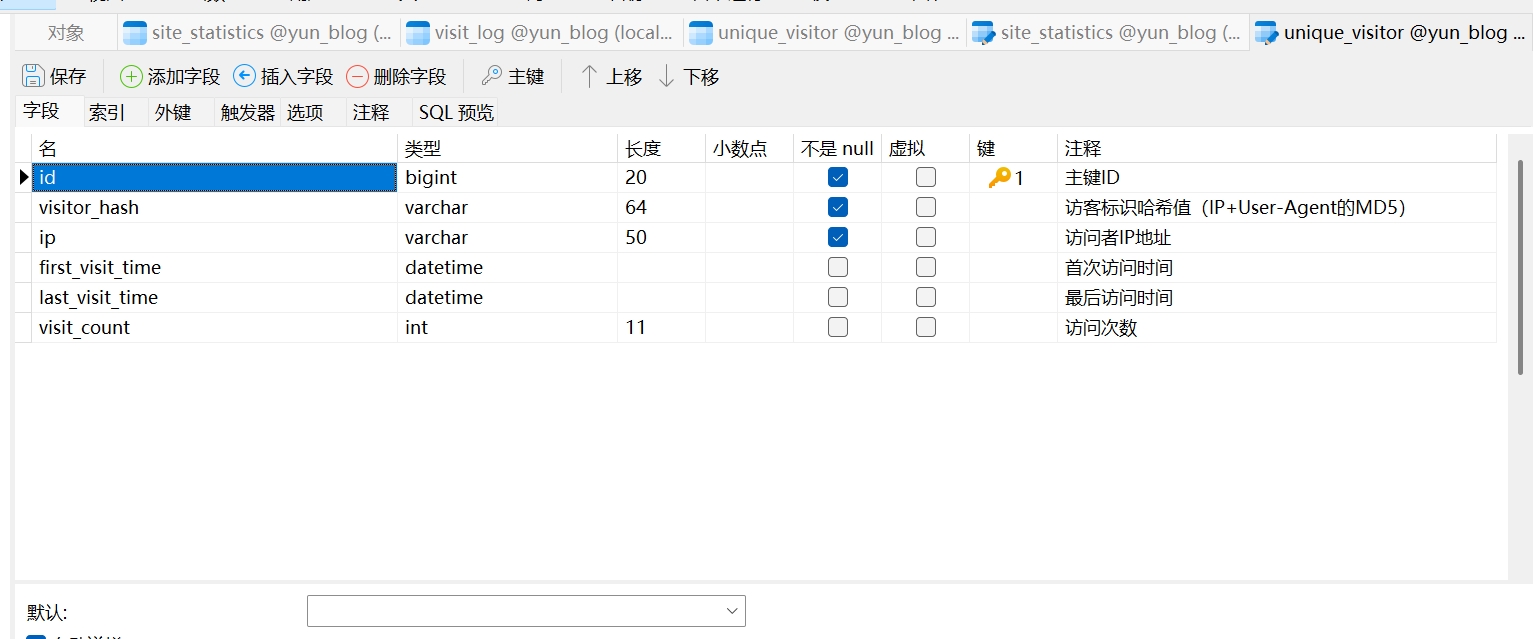
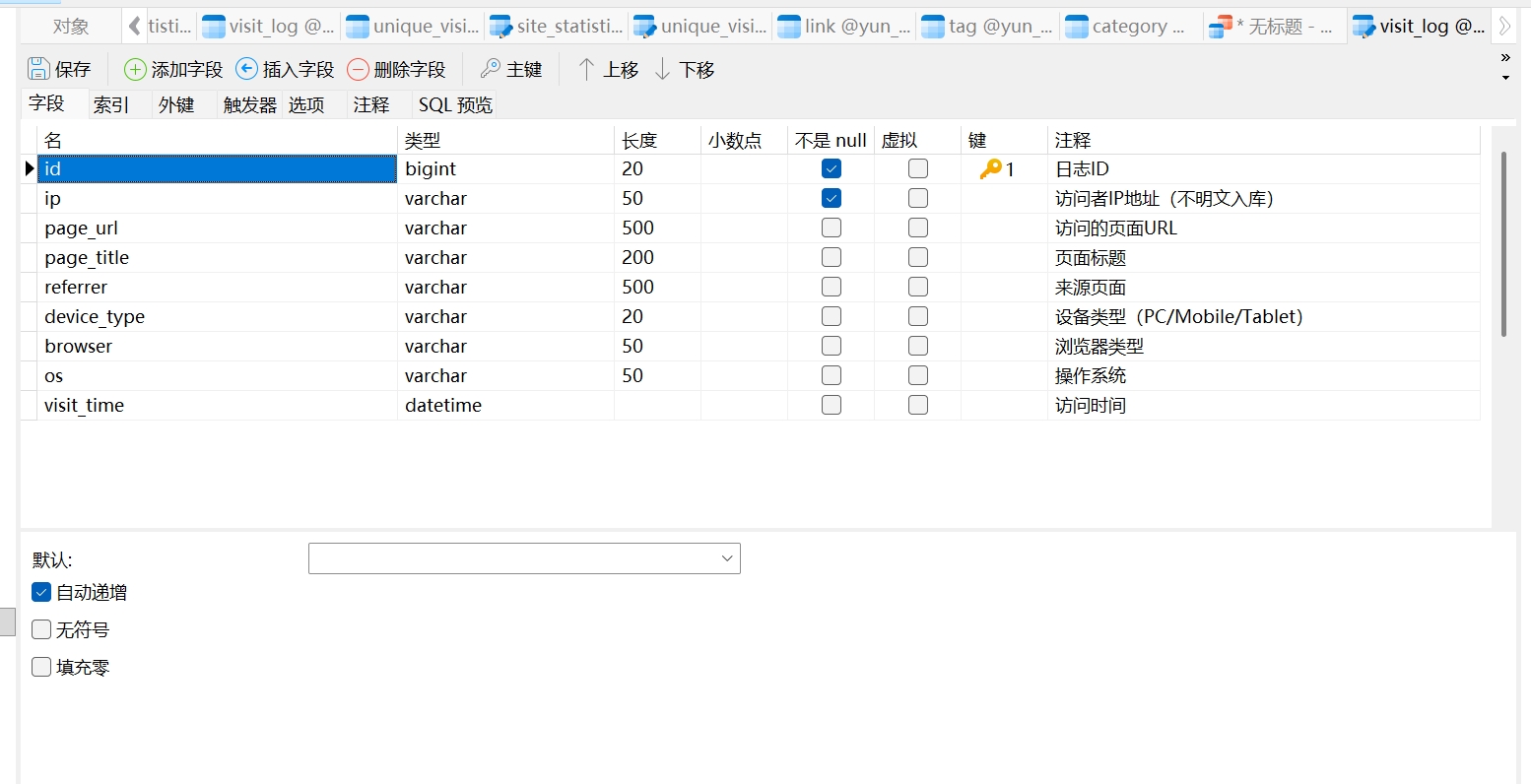
首先设计三张数据库表
site_statistics(网站统计表,用于统计预览量)
unique_visitor(独立访客记录表,用于每个用户的访问记录)
visit_log(访问日志表,用于记录用户访问日志)
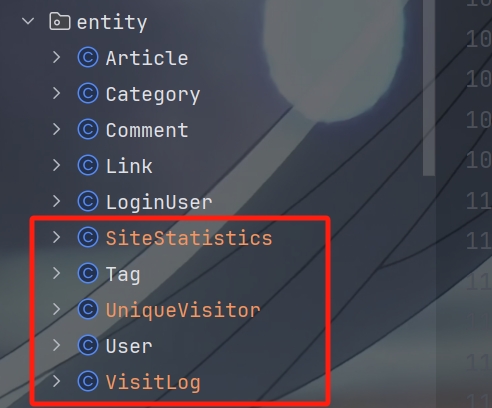
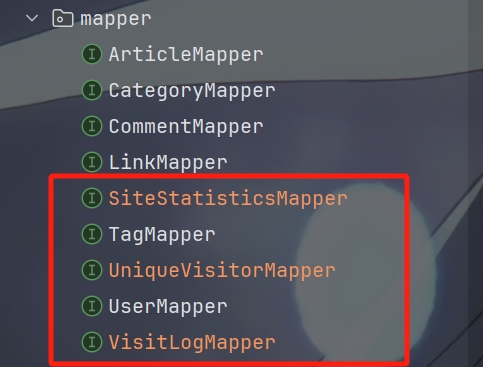
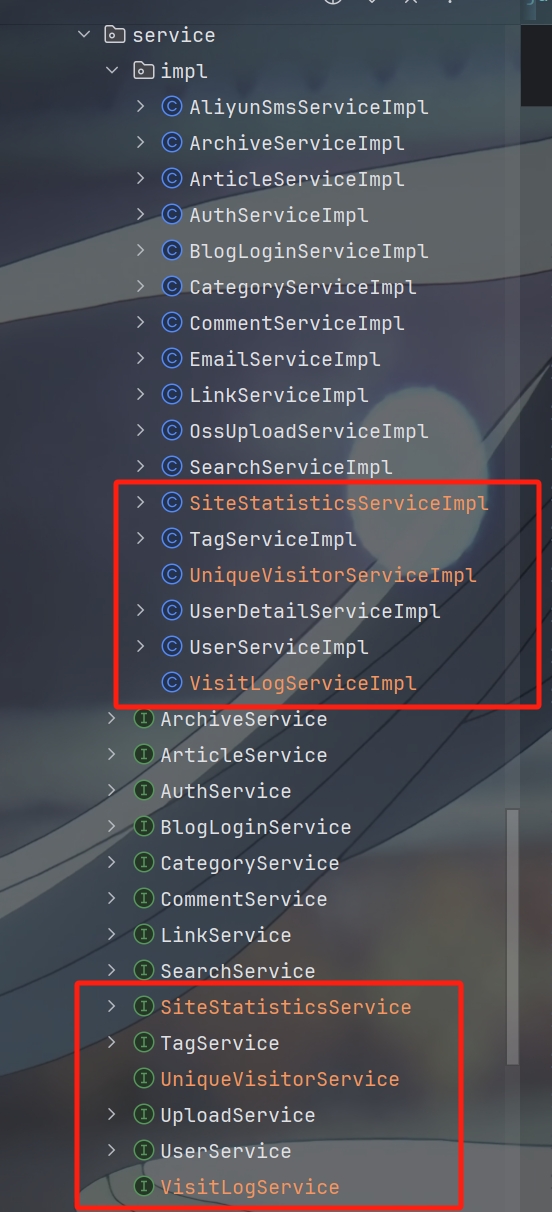
然后根据数据表自动生成对应的类,entity类,mapper类,服务接口,服务接口实现类
生成实体类
生成mapper类
生成服务接口,服务接口实现类
新建几个常量用于redis中存储预览量,预览总数和预览日志等
1 2 3 4 5 6 7 8 9 10 11 12 13 14 15 16 17 18 19 20 21 22 23 24 public static final String SITE_TOTAL_VIEWS = "site:totalViews" ;public static final String SITE_TOTAL_VIEWS_FIELD = "total" ;public static final String SITE_TOTAL_VISITORS = "site:totalVisitors" ;public static final String SITE_TOTAL_VISITORS_FIELD = "total" ;public static final String SITE_VISITOR_SET_PREFIX = "site:visitor:set:" ;public static final String VISIT_LOG_QUEUE = "site:visitLog:queue" ;
在UpdateViewCountJob类中新加updateSiteStatistics和flushVisitLogs方法
1 2 3 4 5 6 7 8 9 10 11 12 13 14 15 16 17 18 19 20 21 22 23 24 25 26 27 28 29 @Scheduled(cron = "0 0/10 * * * ?") public void updateSiteStatistics () SiteStatistics statistics = new SiteStatistics ();1L );Integer cachedViews = redisCache.getCacheMapValue(SystemConstants.SITE_TOTAL_VIEWS, SystemConstants.SITE_TOTAL_VIEWS_FIELD);if (cachedViews != null ) {Integer cachedVisitors = redisCache.getCacheMapValue(SystemConstants.SITE_TOTAL_VISITORS, SystemConstants.SITE_TOTAL_VISITORS_FIELD);if (cachedVisitors != null ) {@Scheduled(cron = "0 0/5 * * * ?") public void flushVisitLogs () if (logs != null && !logs.isEmpty()) {
在ViewCountRunner类中添加 加载网站 PV 和 UV 到 Redis 的代码片段
1 2 3 4 5 6 7 SiteStatistics statistics = siteStatisticsMapper.selectById(1L );long totalViews = (statistics != null && statistics.getTotalViews() != null ) ? statistics.getTotalViews() : 0L ;long totalVisitors = (statistics != null && statistics.getTotalVisitors() != null ) ? statistics.getTotalVisitors() : 0L ;int ) totalViews);int ) totalVisitors);
在RedisCache工具类中添加pushToList,popAllFromList,addToSet
1 2 3 4 5 6 7 8 9 10 11 12 13 14 15 16 17 18 19 20 21 22 23 24 25 26 27 28 29 30 31 32 33 34 35 36 37 38 39 40 public <T> void pushToList (final String key, final T value) public <T> List<T> popAllFromList (final String key) Long size = redisTemplate.opsForList().size(key);if (size == null || size == 0 ) {return Collections.emptyList();0 , -1 );return result == null ? Collections.emptyList() : result;public <T> boolean addToSet (final String key, final T value) Long result = redisTemplate.opsForSet().add(key, value);return result != null && result > 0 ;
新建RecordVisitDto类
1 2 3 4 5 6 7 8 9 10 11 12 13 14 15 16 17 @Data @ApiModel(description = "记录访问请求对象") public class RecordVisitDto {@ApiModelProperty(value = "访问的页面URL", required = true, example = "/article/1") private String pageUrl;@ApiModelProperty(value = "页面标题", example = "文章标题") private String pageTitle;@ApiModelProperty(value = "来源页面", example = "https://www.google.com") private String referrer;
再新建SiteInfoVo
1 2 3 4 5 6 7 8 9 10 11 12 13 14 15 16 17 18 19 20 21 22 23 24 25 @Data @AllArgsConstructor @NoArgsConstructor @ApiModel(description = "网站统计信息") public class SiteInfoVo {@ApiModelProperty(value = "总访问量(PV)") private Long totalViews;@ApiModelProperty(value = "总访客数(UV)") private Long totalVisitors;@ApiModelProperty(value = "文章总数") private Integer articleCount;@ApiModelProperty(value = "分类总数") private Integer categoryCount;@ApiModelProperty(value = "标签总数") private Integer tagCount;
接下来就是在SiteStatisticsServiceImpl中写相关的功能
需要注意的是下面的包含了siteInfo和recordVisit两个接口的功能
1 2 3 4 5 6 7 8 9 10 11 12 13 14 15 16 17 18 19 20 21 22 23 24 25 26 27 28 29 30 31 32 33 34 35 36 37 38 39 40 41 42 43 44 45 46 47 48 49 50 51 52 53 54 55 56 57 58 59 60 61 62 63 64 65 66 67 68 69 70 71 72 73 74 75 76 77 78 79 80 81 82 83 84 85 86 87 88 89 90 91 92 93 94 95 96 97 98 99 100 101 102 103 104 105 106 107 108 109 110 111 112 113 114 115 116 117 118 119 120 121 122 123 124 125 126 127 128 129 130 131 132 133 134 135 136 137 138 139 140 141 142 143 144 145 146 147 148 149 150 151 152 153 154 155 156 157 158 159 160 161 162 163 164 165 166 167 168 169 170 171 172 173 @Service("siteStatisticsService") public class SiteStatisticsServiceImpl extends ServiceImpl <SiteStatisticsMapper, SiteStatistics> implements SiteStatisticsService {@Autowired private ArticleService articleService;@Autowired private CategoryMapper categoryMapper;@Autowired private TagMapper tagMapper;@Autowired private RedisCache redisCache;@Autowired private RedisTemplate redisTemplate;@Override public ResponseResult getSiteInfo () Integer cachedViews = redisCache.getCacheMapValue(SystemConstants.SITE_TOTAL_VIEWS, SystemConstants.SITE_TOTAL_VIEWS_FIELD);long totalViews = cachedViews != null ? cachedViews.longValue() : 0L ;Integer cachedVisitors = redisCache.getCacheMapValue(SystemConstants.SITE_TOTAL_VISITORS, SystemConstants.SITE_TOTAL_VISITORS_FIELD);long totalVisitors = cachedVisitors != null ? cachedVisitors.longValue() : 0L ;int articleCount = (int ) articleService.count(new LambdaQueryWrapper <Article>()int categoryCount = categoryMapper.selectCount(new LambdaQueryWrapper <Category>()int tagCount = tagMapper.selectCount(new LambdaQueryWrapper <Tag>()SiteInfoVo siteInfoVo = new SiteInfoVo (totalViews, totalVisitors, articleCount, categoryCount, tagCount);return ResponseResult.okResult(siteInfoVo);@Override public ResponseResult recordVisit (RecordVisitDto recordVisitDto, HttpServletRequest request) String ip = IpUtils.getIpAddr(request);String userAgent = request.getHeader("User-Agent" );if (userAgent == null ) {"" ;String rateLimitKey = "rate:recordVisit:" + ip + ":" + (System.currentTimeMillis() / 60000 );Long count = redisTemplate.opsForValue().increment(rateLimitKey);if (count == 1 ) {70 , java.util.concurrent.TimeUnit.SECONDS);if (count > 30 ) {throw new SystemException (AppHttpCodeEnum.IP_REQUEST_LIMIT);String maskedIp = maskIp(ip);VisitLog visitLog = new VisitLog ();if (!userAgent.isEmpty()) {String pageUrl = recordVisitDto.getPageUrl();if (pageUrl != null && pageUrl.contains("?" )) {0 , pageUrl.indexOf('?' ));new Date ());1 );String visitorHash = DigestUtils.md5DigestAsHex((ip + userAgent).getBytes(StandardCharsets.UTF_8));String monthKey = SystemConstants.SITE_VISITOR_SET_PREFIX"yyyy-MM" ));boolean isNewVisitor = redisCache.addToSet(monthKey, visitorHash);if (isNewVisitor) {1 );return ResponseResult.okResult();private String parseDeviceType (String ua) if (ua.contains("Mobile" ) || ua.contains("Android" ) && !ua.contains("Tablet" )) {return "Mobile" ;else if (ua.contains("Tablet" ) || ua.contains("iPad" )) {return "Tablet" ;return "PC" ;private String parseBrowser (String ua) if (ua.contains("Edg/" ) || ua.contains("Edge/" )) return "Edge" ;if (ua.contains("OPR/" ) || ua.contains("Opera" )) return "Opera" ;if (ua.contains("Chrome" )) return "Chrome" ;if (ua.contains("Firefox" )) return "Firefox" ;if (ua.contains("Safari" ) && !ua.contains("Chrome" )) return "Safari" ;if (ua.contains("MSIE" ) || ua.contains("Trident" )) return "IE" ;return "Unknown" ;private String parseOs (String ua) if (ua.contains("Windows NT" )) return "Windows" ;if (ua.contains("Mac OS X" )) return "macOS" ;if (ua.contains("Android" )) return "Android" ;if (ua.contains("iPhone" ) || ua.contains("iPad" )) return "iOS" ;if (ua.contains("Linux" )) return "Linux" ;return "Unknown" ;private String maskIp (String ip) if (ip == null || ip.isEmpty()) return "unknown" ;if (ip.contains(":" )) {":" );if (parts.length >= 2 ) {1 ] = "*" ;2 ] = "*" ;return String.join(":" , parts);return ip;int lastDot = ip.lastIndexOf('.' );if (lastDot > 0 ) {return ip.substring(0 , lastDot) + ".*" ;return ip;
没想到一个小小的记录访客模块要写这么多功能
主要是要记录用户访问量时需要记录的信息要避免违法,做到只记录与预览有关的
还有这些接口我都比较想将他们做成和文章预览量那样先存redis再存数据库,避免给数据库过大压力
这样要写好多相关工具类,工作量巨大
好在最后也是完成这个接口的设计了
PS:该系列只做为作者学习开发项目做的笔记用
不一定符合读者来学习,仅供参考
预告 后续会记录博客的开发过程
每次学习会做一份笔记来进行发表
“一花一世界,一叶一菩提”
版权所有 © 2026 云梦泽https://hgt12.github.io/