『博客开发日记-后台』之导出评论数据接口的实现

本文最后更新于 2026年5月3日 晚上

导出评论数据接口的实现


导出评论数据接口的需求

首先导出数据不只是单单只导出所有数据

要支持有条件查询的数据导出(这部分和查询评论列表很像,代码直接复制查询评论列表的就行)

需要注意的是,导出的 excel 没办法像评论列表里那样展示出树状列表(至少我现在没办法将其导出的数据处理成 excel 版的树状列表)

所以导出的 excel 表的评论以直线列表的形式展示

还要支持 导出当前页 和 导出所有数据 两种导出形式(只要对是否传入分页参数进行处理就行了)

要对数据表里的 type 和 status 两个字段进行转换返回

因为数据表里用 0,1,2 的数字形式代表类别或者状态

将他们转换成中文容易理解的形式进行返回 利于观看


代码实现

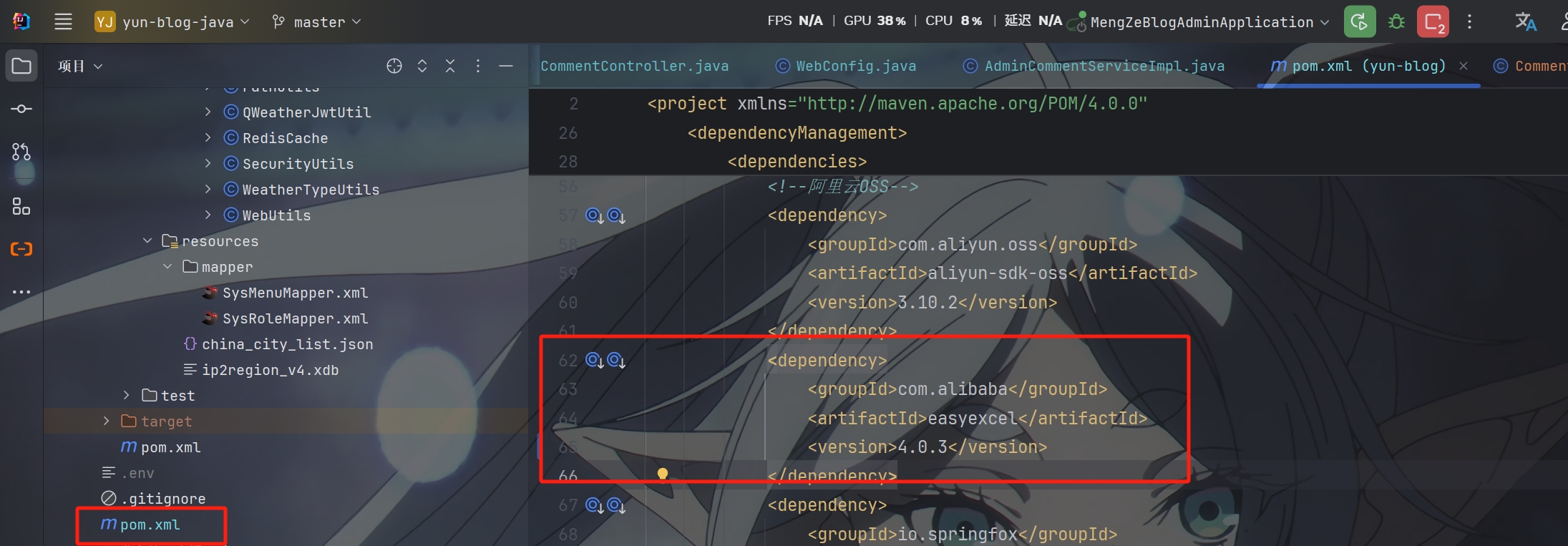
先导入插件


使用 ExcelExportUtil 工具来处理导出的数据

1
2
3
4
5
6
7
8
9
10
11
12
13
14
15
16
17
18
19
20
21
22
23
24
25
26
27
28
29
30
31
32
33
34
35
36
37
38
39
40
41
42
43
44
45
46
47
48
49
50
51
52
53
54
55
56
57
58
59
60
61
62
63
64
65
66
67
68
69
70
71
72
73
74
75
76
77
78
79
80
81
82
83
84
85
86
87
88
89
90
91
92
93
94
95
96
97
98
99
100
101
102
103
104
105
106
107
108
109
110
111
112
113
114
115
116
117
118
119
120
121
122
123
124
125
126
127
128
129
130
131
132
133
134
135
136
137
138
139
140
141
142
143
144
145
146
147
148
149
150
151
152
153
154
155
156
157
158
159
160
161
162
163
164
165
166
167
168
169
170
171
172
173
174
175
176
177
178
179
180
181
182
183
184
185
186
187
188
189
190
191
192
193
194
195
196
197
198
199
200
201
202
203
204
205
/**
* Excel导出工具类
* 基于EasyExcel实现Excel文件导出功能
*
* @author mengze
*/
public class ExcelExportUtil
{
/**
* 导出Excel文件(通用方法)
*
* @param response HttpServletResponse对象
* @param data 要导出的数据列表
* @param clazz 数据对应的实体类Class(需要使用@ExcelProperty注解标注字段)
* @param fileName 导出的文件名(不含扩展名)
* @param sheetName Excel工作表名称
* @param <T> 数据类型
* @throws IOException IO异常
*/
public static <T> void exportExcel(HttpServletResponse response,
List<T> data,
Class<T> clazz,
String fileName,
String sheetName) throws IOException
{
try {
// 设置响应头
setExcelResponseHeader(response, fileName);

// 使用EasyExcel写入数据
EasyExcel.write(response.getOutputStream(), clazz)
.autoCloseStream(Boolean.FALSE) // 不自动关闭流,由Servlet容器管理
.registerWriteHandler(new LongestMatchColumnWidthStyleStrategy()) // 自动列宽
.sheet(sheetName)
.doWrite(data);

} catch (Exception e) {
// 重置response
response.reset();
response.setContentType("application/json");
response.setCharacterEncoding("utf-8");
throw new IOException("Excel导出失败: " + e.getMessage(), e);
}
}

/**
* 导出Excel文件(简化版,使用默认sheet名称)
*
* @param response HttpServletResponse对象
* @param data 要导出的数据列表
* @param clazz 数据对应的实体类Class
* @param fileName 导出的文件名(不含扩展名)
* @param <T> 数据类型
* @throws IOException IO异常
*/
public static <T> void exportExcel(HttpServletResponse response,
List<T> data,
Class<T> clazz,
String fileName) throws IOException
{
exportExcel(response, data, clazz, fileName, "Sheet1");
}

/**
* 导出Excel文件(从RequestContextHolder获取response)
*
* @param data 要导出的数据列表
* @param clazz 数据对应的实体类Class
* @param fileName 导出的文件名(不含扩展名)
* @param sheetName Excel工作表名称
* @param <T> 数据类型
* @throws IOException IO异常
*/
public static <T> void exportExcel(List<T> data,
Class<T> clazz,
String fileName,
String sheetName) throws IOException
{
ServletRequestAttributes attributes = (ServletRequestAttributes) RequestContextHolder.getRequestAttributes();
if (attributes == null) {
throw new IOException("无法获取HttpServletResponse对象");
}
HttpServletResponse response = attributes.getResponse();
if (response == null) {
throw new IOException("HttpServletResponse对象为空");
}
exportExcel(response, data, clazz, fileName, sheetName);
}

/**
* 设置Excel文件下载的响应头
*
* @param response HttpServletResponse对象
* @param fileName 文件名(不含扩展名)
* @throws IOException IO异常
*/
private static void setExcelResponseHeader(HttpServletResponse response, String fileName) throws IOException
{
try {
// 设置内容类型为Excel
response.setContentType("application/vnd.openxmlformats-officedocument.spreadsheetml.sheet");
response.setCharacterEncoding("utf-8");

// URL编码文件名,防止中文乱码
String encodedFileName = URLEncoder.encode(fileName, "UTF-8").replaceAll("\\+", "%20");

// 设置Content-Disposition响应头,告诉浏览器以附件形式下载
response.setHeader("Content-Disposition", "attachment;filename*=utf-8''" + encodedFileName + ".xlsx");

// 设置其他响应头
response.setHeader("Cache-Control", "no-cache, no-store, must-revalidate");
response.setHeader("Pragma", "no-cache");
response.setHeader("Expires", "0");

} catch (Exception e) {
throw new IOException("设置响应头失败: " + e.getMessage(), e);
}
}

/**
* 导出多个Sheet的Excel文件
*
* @param response HttpServletResponse对象
* @param fileName 导出的文件名(不含扩展名)
* @param sheets Sheet数据列表
* @throws IOException IO异常
*/
public static void exportMultiSheetExcel(HttpServletResponse response,
String fileName,
List<SheetData<?>> sheets) throws IOException
{
try {
// 设置响应头
setExcelResponseHeader(response, fileName);

// 创建ExcelWriter
com.alibaba.excel.ExcelWriter excelWriter = EasyExcel.write(response.getOutputStream())
.autoCloseStream(Boolean.FALSE)
.registerWriteHandler(new LongestMatchColumnWidthStyleStrategy())
.build();

// 写入多个Sheet
for (int i = 0; i < sheets.size(); i++) {
SheetData<?> sheetData = sheets.get(i);
com.alibaba.excel.write.metadata.WriteSheet writeSheet = EasyExcel.writerSheet(i, sheetData.getSheetName())
.head(sheetData.getClazz())
.build();
excelWriter.write(sheetData.getData(), writeSheet);
}

// 关闭ExcelWriter
excelWriter.finish();

} catch (Exception e) {
// 重置response
response.reset();
response.setContentType("application/json");
response.setCharacterEncoding("utf-8");
throw new IOException("Excel导出失败: " + e.getMessage(), e);
}
}

/**
* Sheet数据封装类(用于多Sheet导出)
*
* @param <T> 数据类型
*/
public static class SheetData<T>
{
private String sheetName;
private Class<T> clazz;
private List<T> data;

public SheetData(String sheetName, Class<T> clazz, List<T> data) {
this.sheetName = sheetName;
this.clazz = clazz;
this.data = data;
}

public String getSheetName() {
return sheetName;
}

public void setSheetName(String sheetName) {
this.sheetName = sheetName;
}

public Class<T> getClazz() {
return clazz;
}

public void setClazz(Class<T> clazz) {
this.clazz = clazz;
}

public List<T> getData() {
return data;
}

public void setData(List<T> data) {
this.data = data;
}
}
}


新建 CommentExportVo

1
2
3
4
5
6
7
8
9
10
11
12
13
14
15
16
17
18
19
20
21
22
23
24
25
26
27
28
29
30
31
32
33
34
35
36
37
38
39
40
41
42
43
44
45
46
47
48
49
50
51
52
53
54
55
56
57
/**
* 导出评论VO
* 用于EasyExcel导出评论数据
*
* @author mengze
*/
@Data
@AllArgsConstructor
@NoArgsConstructor
@ApiModel(description = "评论导出响应对象")
@ExcelIgnoreUnannotated // 只导出有@ExcelProperty注解的字段
public class CommentExportVo
{
@ExcelProperty(value = "评论ID", index = 0)
@ColumnWidth(15)
private String id;

@ExcelProperty(value = "评论类型", index = 1)
@ColumnWidth(12)
private String typeName;

@ExcelProperty(value = "文章标题", index = 2)
@ColumnWidth(30)
private String articleTitle;

@ExcelProperty(value = "昵称", index = 3)
@ColumnWidth(15)
private String nickname;

@ExcelProperty(value = "邮箱", index = 4)
@ColumnWidth(25)
private String email;

@ExcelProperty(value = "个人网址", index = 5)
@ColumnWidth(30)
private String personalWebsite;

@ExcelProperty(value = "评论内容", index = 6)
@ColumnWidth(50)
private String content;

@ExcelProperty(value = "回复目标", index = 7)
@ColumnWidth(15)
private String replyToNickname;

@ExcelProperty(value = "点赞数", index = 8)
@ColumnWidth(10)
private Integer likeCount;

@ExcelProperty(value = "审核状态", index = 9)
@ColumnWidth(12)
private String statusName;

@ExcelProperty(value = "创建时间", index = 10)
@ColumnWidth(20)
private String createTime;
}

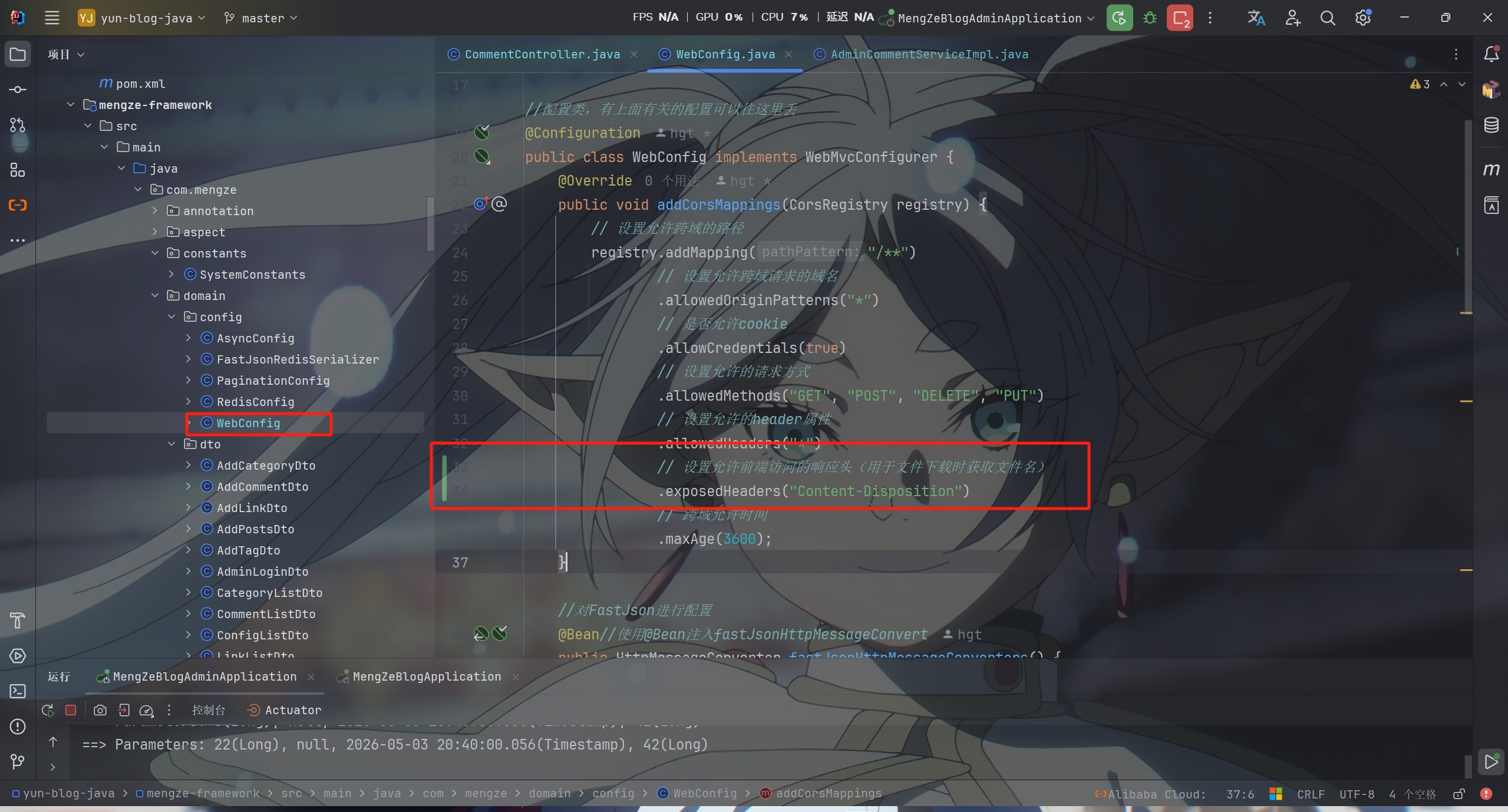
在 WebConfig 中允许前端访问自定义响应头 Content-Disposition


在 CommentController 中添加接口并对导出数据进行处理

1
2
3
4
5
6
7
8
9
10
11
12
13
14
15
16
17
18
19
20
21
22
23
24
25
26
27
28
29
30
31
32
33
34
35
36
37
38
39
40
41
42
43
44
45
46
47
48
49
50
51
52
53
54
55
56
57
58
59
60
61
62

@GetMapping("/export")
@SystemLog(businessName = "导出评论数据")
@ApiOperation(value = "导出评论数据", notes = "导出评论数据")
@ApiImplicitParams({
@ApiImplicitParam(name = "pageNum", value = "页号", dataType = "int", paramType = "query"),
@ApiImplicitParam(name = "pageSize", value = "每页数量", dataType = "int", paramType = "query"),
@ApiImplicitParam(name = "keywords", value = "搜索关键字", dataType = "string", paramType = "query"),
@ApiImplicitParam(name = "type", value = "评论类型", dataType = "string", paramType = "query"),
@ApiImplicitParam(name = "status", value = "审核状态", dataType = "string", paramType = "query"),
@ApiImplicitParam(name = "articleId", value = "文章ID", dataType = "string", paramType = "query"),
@ApiImplicitParam(name = "startTime", value = "开始时间", dataType = "string", paramType = "query"),
@ApiImplicitParam(name = "endTime", value = "结束时间", dataType = "string", paramType = "query")
})
public void exportComment(Integer pageNum, Integer pageSize, @Valid CommentListDto commentListDto, HttpServletResponse response)
{
try {
//调用服务层获取导出数据
ResponseResult result = adminCommentService.exportComment(pageNum, pageSize, commentListDto);

//检查结果
if (result.getCode() != 200 || result.getData() == null) {
throw new RuntimeException("获取导出数据失败");
}

//获取导出数据列表
@SuppressWarnings("unchecked")
List<CommentExportVo> exportData = (List<CommentExportVo>) result.getData();

//检查数据是否为空
if (exportData.isEmpty()) {
throw new RuntimeException("没有可导出的数据");
}

//生成文件名+时间(格式:评论数据_20260503_143056)
String fileName = "评论数据_" + new SimpleDateFormat("yyyyMMdd_HHmmss").format(new Date());

//使用工具类导出Excel
ExcelExportUtil.exportExcel(response, exportData, CommentExportVo.class, fileName, "评论数据");

} catch (Exception e) {
//异常处理:只有在响应流未被写入时才能返回JSON错误
e.printStackTrace();

//检查响应是否已提交
if (!response.isCommitted()) {
try {
response.reset();
response.setContentType("application/json");
response.setCharacterEncoding("utf-8");

ResponseResult result = ResponseResult.errorResult(
AppHttpCodeEnum.SYSTEM_ERROR.getCode(),
"导出失败: " + e.getMessage()
);
WebUtils.renderString(response, JSON.toJSONString(result));
} catch (Exception ex) {
ex.printStackTrace();
}
}
}
}

最后在 AdminCommentServiceImpl 中实现接口方法

1
2
3
4
5
6
7
8
9
10
11
12
13
14
15
16
17
18
19
20
21
22
23
24
25
26
27
28
29
30
31
32
33
34
35
36
37
38
39
40
41
42
43
44
45
46
47
48
49
50
51
52
53
54
55
56
57
58
59
60
61
62
63
64
65
66
67
68
69
70
71
72
73
74
75
76
77
78
79
80
81
82
83
84
85
86
87
88
89
90
91
92
93
94
95
96
97
98
99
100
101
102
103
104
105
106
107
108
109
110
111
112
113
114
115
116
117
118
119
120
121
122
123
124
125
126
127
128
129
130
131
132
133
134
135
136
137
138
139
140
141
142
143
144
145
146
147
148
149
150
151
152
153
//导出评论数据列表
@Override
public ResponseResult exportComment(Integer pageNum, Integer pageSize, CommentListDto commentListDto)
{
//构建查询条件
LambdaQueryWrapper<Comment> queryWrapper = new LambdaQueryWrapper<>();

//关键字模糊搜索
queryWrapper.like(StringUtils.hasText(commentListDto.getKeywords()), Comment::getContent, commentListDto.getKeywords());

//评论类型筛选
queryWrapper.eq(StringUtils.hasText(commentListDto.getType()), Comment::getType, commentListDto.getType());

//审核状态筛选
queryWrapper.eq(StringUtils.hasText(commentListDto.getStatus()), Comment::getStatus, commentListDto.getStatus());

//文章ID筛选(type=0,即为文章评论时)
if (StringUtils.hasText(commentListDto.getArticleId())
&& SystemConstants.COMMENT_TYPE_ARTICLE.equals(commentListDto.getType())) {
queryWrapper.eq(Comment::getArticleId, Long.parseLong(commentListDto.getArticleId()));
}

//时间范围筛选
queryWrapper.ge(StringUtils.hasText(commentListDto.getStartTime()), Comment::getCreateTime, commentListDto.getStartTime())
.le(StringUtils.hasText(commentListDto.getEndTime()), Comment::getCreateTime, commentListDto.getEndTime());

//按创建时间倒序排列
queryWrapper.orderByDesc(Comment::getCreateTime);

//根据是否传入分页参数决定查询方式
List<Comment> comments;
if (pageNum != null && pageSize != null && pageNum > 0 && pageSize > 0) {
//分页查询
Page<Comment> page = new Page<>(pageNum, pageSize);
commentMapper.selectPage(page, queryWrapper);
comments = page.getRecords();
} else {
//查询所有符合条件的评论
comments = commentMapper.selectList(queryWrapper);
}

//转换为导出VO
List<CommentExportVo> exportData = toCommentExportVoList(comments);

//返回导出数据
return ResponseResult.okResult(exportData);
}

//转换为CommentExportVo列表
private List<CommentExportVo> toCommentExportVoList(List<Comment> comments)
{
if (comments == null || comments.isEmpty()) {
return new ArrayList<>();
}

//批量查询文章标题
List<Long> articleIds = comments.stream()
.filter(c -> c.getArticleId() != null && c.getArticleId() > 0)
.map(Comment::getArticleId)
.distinct()
.collect(Collectors.toList());

Map<Long, String> articleTitleMap = new HashMap<>();
if (!articleIds.isEmpty()) {
List<Article> articles = articleMapper.selectBatchIds(articleIds);
articleTitleMap = articles.stream()
.collect(Collectors.toMap(Article::getId, Article::getTitle));
}

//批量查询回复目标昵称
List<Long> replyToCommentIds = comments.stream()
.filter(c -> c.getReplyToCommentId() != null && c.getReplyToCommentId() > 0)
.map(Comment::getReplyToCommentId)
.distinct()
.collect(Collectors.toList());

Map<Long, String> replyToNicknameMap = new HashMap<>();
if (!replyToCommentIds.isEmpty()) {
List<Comment> replyToComments = commentMapper.selectBatchIds(replyToCommentIds);
replyToNicknameMap = replyToComments.stream()
.collect(Collectors.toMap(Comment::getId, Comment::getNickname));
}

//转换为导出VO
SimpleDateFormat sdf = new SimpleDateFormat("yyyy-MM-dd HH:mm:ss");
List<CommentExportVo> exportList = new ArrayList<>();

for (Comment comment : comments)
{
CommentExportVo vo = new CommentExportVo();
vo.setId(String.valueOf(comment.getId()));

//评论类型转换为中文
String typeName = getCommentTypeName(comment.getType());
vo.setTypeName(typeName);

//设置文章标题
if (comment.getArticleId() != null && comment.getArticleId() > 0) {
vo.setArticleTitle(articleTitleMap.get(comment.getArticleId()));
}

//设置用户信息
vo.setNickname(comment.getNickname());
vo.setEmail(comment.getEmail());
vo.setPersonalWebsite(comment.getPersonalWebsite());

//设置评论内容
vo.setContent(comment.getContent());

//设置回复目标昵称
if (comment.getReplyToCommentId() != null && comment.getReplyToCommentId() > 0) {
vo.setReplyToNickname(replyToNicknameMap.get(comment.getReplyToCommentId()));
}

vo.setLikeCount(comment.getLikeCount());

//审核状态转换为中文
String statusName = getCommentStatusName(comment.getStatus());
vo.setStatusName(statusName);

vo.setCreateTime(sdf.format(comment.getCreateTime()));

exportList.add(vo);
}

return exportList;
}

//获取评论类型名称
private String getCommentTypeName(String type)
{
if (SystemConstants.COMMENT_TYPE_ARTICLE.equals(type)) {
return "文章评论";
} else if (SystemConstants.COMMENT_TYPE_LINK.equals(type)) {
return "友链评论";
} else if (SystemConstants.COMMENT_TYPE_MESSAGE.equals(type)) {
return "留言板评论";
}
return "未知类型";
}

//获取评论状态名称
private String getCommentStatusName(String status)
{
if (SystemConstants.COMMENT_STATUS_NORMAL.equals(status)) {
return "正常";
} else if (SystemConstants.COMMENT_STATUS_PENDING_REVIEW.equals(status)) {
return "待审核";
} else if (SystemConstants.COMMENT_STATUS_REVIEW_NOT_PASSED.equals(status)) {
return "审核未通过";
}
return "未知状态";
}

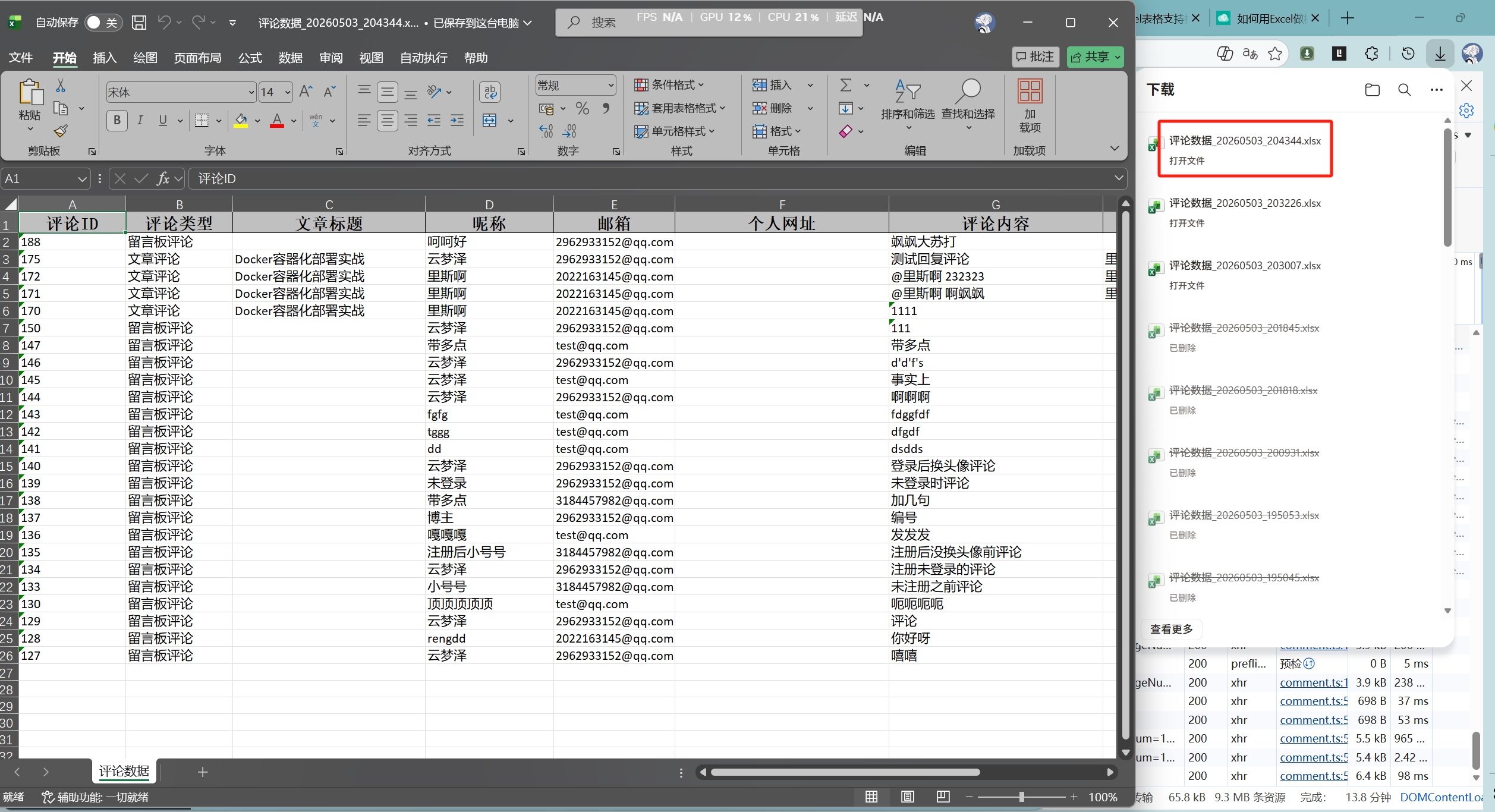
这样导出接口就完成啦

而且导出的表名和导出的数据也是正确的


PS:该系列只做为作者学习开发项目做的笔记用

不一定符合读者来学习,仅供参考


预告

后续会记录博客的开发过程

每次学习会做一份笔记来进行发表

“一花一世界,一叶一菩提”


版权所有 © 2026 云梦泽
欢迎访问我的个人网站:https://hgt12.github.io/


『博客开发日记-后台』之导出评论数据接口的实现
http://example.com/2026/05/03/『博客开发日记-后台』之导出评论数据接口的实现/
作者
云梦泽
发布于
2026年5月3日
更新于
2026年5月3日
许可协议