本文最后更新于 2026年6月6日 下午
获取系统配置链列表接口的实现
获取系统配置列表接口的需求
根据关键字(配置名称,配置键)模糊查询系统配置名称
按id顺序排序
不能查出已删除的配置(spring-boot中已配置)
代码实现
创建 ConfigController
1
2
3
4
5
6
7
8
9
10
11
12
13
14
15
16
17
18
19
20
21
22
23
24
25
|
@RestController
@RequestMapping("/configs")
@Api(tags = "系统配置", description = "系统配置接口")
public class ConfigController
{
@Autowired
AdminConfigService adminConfigService;
@GetMapping
@SystemLog(businessName = "配置分页列表")
@ApiOperation(value = "配置列表", notes = "配置分页列表", response = PageVo.class)
@ApiImplicitParams({
@ApiImplicitParam(name = "pageNum", value = "页号", dataType = "int", paramType = "query"),
@ApiImplicitParam(name = "pageSize", value = "每页数量", dataType = "int", paramType = "query"),
@ApiImplicitParam(name = "keywords", value = "搜索关键字", dataType = "string", paramType = "query")
})
public ResponseResult<PageVo> getConfigList(Integer pageNum, Integer pageSize, @Valid AdminConfigListDto adminConfigListDto)
{
return adminConfigService.getConfigList(pageNum, pageSize, adminConfigListDto);
}
}
|
创建 AdminConfigListDto
1
2
3
4
5
6
7
8
9
10
11
12
13
14
15
16
17
|
@Data
@AllArgsConstructor
@NoArgsConstructor
@ApiModel(description = "配置查询请求对象")
public class AdminConfigListDto {
@ApiModelProperty(value = "关键字(用于模糊搜索配置)", example = "配置")
private String keywords;
@Pattern(regexp = "^$|^[01]$", message = "配置分类只能为0或1")
@ApiModelProperty(value = "配置分类(0-前台配置,1-后台配置)", example = "0")
private String configType;
}
|
创建 AdminConfigListVo
1
2
3
4
5
6
7
8
9
10
11
12
13
14
15
16
17
18
19
20
21
22
23
24
25
26
27
28
| @Data
@AllArgsConstructor
@NoArgsConstructor
@ApiModel(description = "系统配置响应对象")
public class AdminConfigListVo
{
@ApiModelProperty(value = "配置ID")
private Long id;
@ApiModelProperty(value = "配置名称")
private String configName;
@ApiModelProperty(value = "配置键")
private String configKey;
@ApiModelProperty(value = "配置值")
private String configValue;
@ApiModelProperty(value = "描述")
private String remark;
@ApiModelProperty(value = "排序", example = "1")
private Integer sort;
@ApiModelProperty(value = "配置分类(0-前台配置,1-后台配置)", example = "0")
private String configType;
}
|
通过插件生成 ConfigMapper AdminConfigService 和AdminConfigServiceImpl
在 AdminConfigServiceImpl 中实现方法
1
2
3
4
5
6
7
8
9
10
11
12
13
14
15
16
17
18
19
20
21
22
23
24
25
26
27
28
29
30
31
32
33
34
35
36
37
38
39
40
| @Autowired
private AdminConfigService adminConfigService;
@Override
public ResponseResult<PageVo> getConfigList(Integer pageNum, Integer pageSize, ConfigListDto configListDto)
{
LambdaQueryWrapper<Config> queryWrapper = new LambdaQueryWrapper<>();
if (StringUtils.hasText(configListDto.getKeywords())){
queryWrapper.and(wrapper -> wrapper
.like(Config::getConfigName, configListDto.getKeywords())
.or()
.like(Config::getConfigKey, configListDto.getKeywords())
);
}
if (StringUtils.hasText(configListDto.getConfigType())) {
queryWrapper.eq(Config::getConfigType, configListDto.getConfigType());
}
queryWrapper.orderByAsc(Config::getSort)
.orderByAsc(Config::getId);
Page<Config> page = new Page<>(pageNum, pageSize);
adminConfigService.page(page, queryWrapper);
List<AdminConfigListVo> configListVos = BeanCopyUtils.copyBeanList(page.getRecords(), AdminConfigListVo.class);
PageVo pageVo = new PageVo(configListVos, page.getTotal());
return ResponseResult.okResult(pageVo);
}
|
测试接口
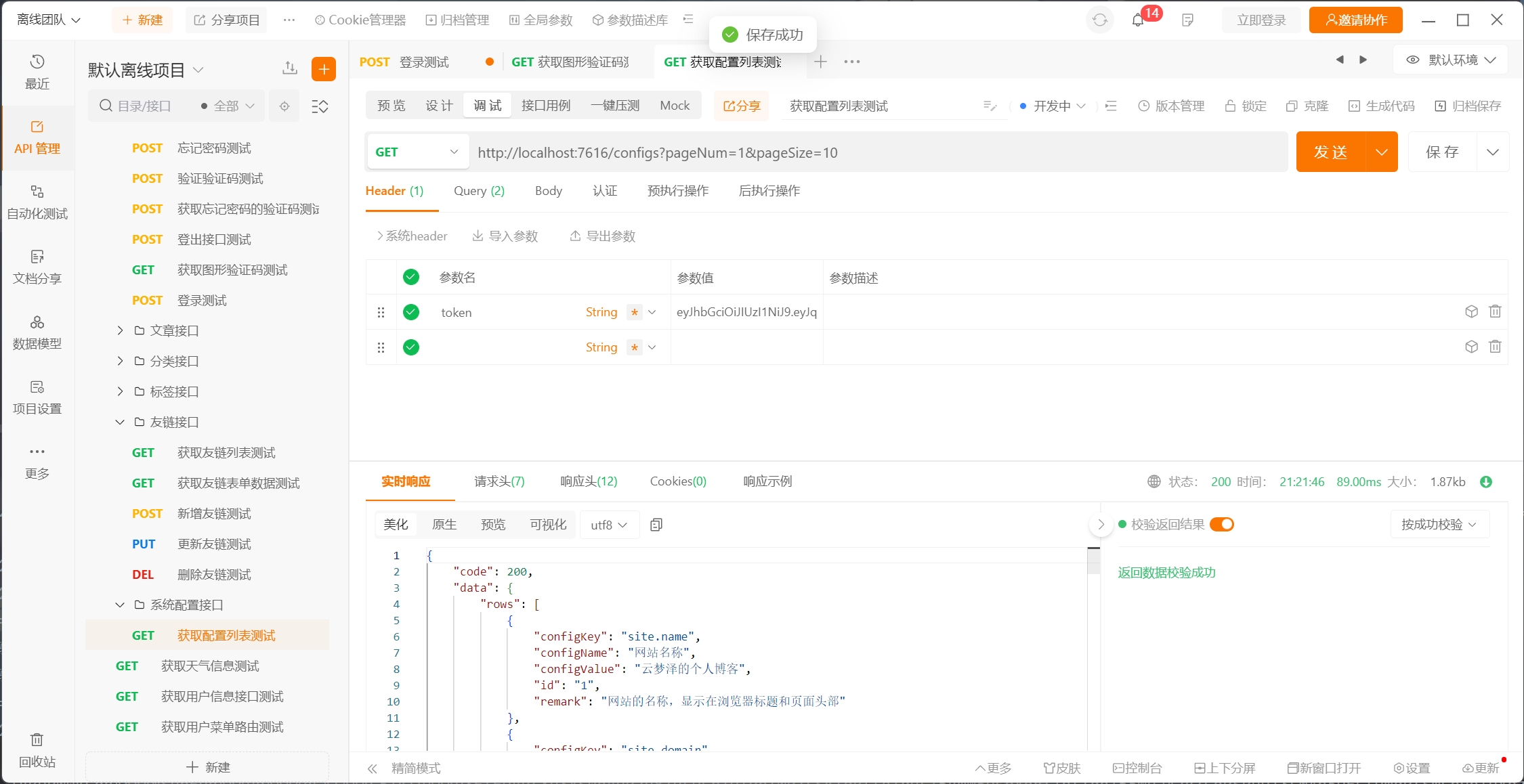
但在前端测试发现没有操作键
经过检查发现是用户缺少相应的权限
所以觉得先完善跟用户权限相关的接口先
这些次要的接口后续再完善
还有一点就是我前台系统中还没有关于系统配置的接口
到时候还要改 改完了再做这个接口了

PS:该系列只做为作者学习开发项目做的笔记用
不一定符合读者来学习,仅供参考
预告
后续会记录博客的开发过程
每次学习会做一份笔记来进行发表
“一花一世界,一叶一菩提”
版权所有 © 2026 云梦泽
欢迎访问我的个人网站:https://hgt12.github.io/