『博客开发日记』之评论系统添加对敏感词的检测功能

本文最后更新于 2026年5月4日 晚上

评论系统添加对敏感词的检测功能


起因

个人网站确实要管理好自己的内容

特别是备案的网站

要有别人评论的内容检测

如果检测到有敏感词的评论,则转到待审核状态审核过后才能发表显示

要不然别人在你的网站卖广告啥的

搞黄色分分钟封了你的网站,再请你去喝茶

所以对评论内容的检测是有必要的

代码实现

实现流程大致如下

用户输入评论内容 > 进入本地敏感词库进行检测 > 无敏感词 > 进入第三方敏感词库进行检测 > 无敏感词 > 进入多个 AI 进行敏感词检测

当中途任意一步检测出敏感词都会使评论进入 待审核 状态

当通过人工审核通过后才允许评论展示发布

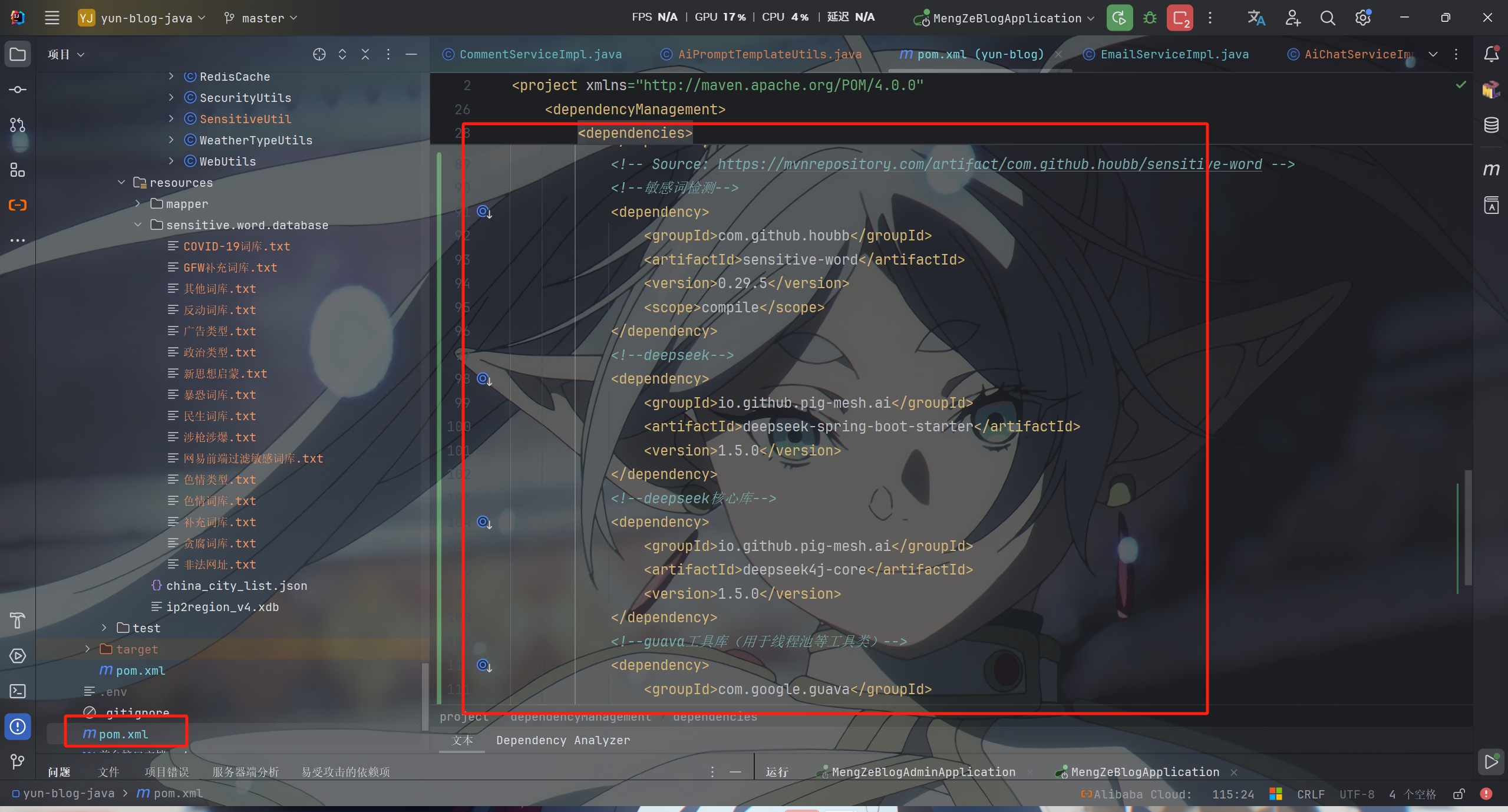
先导入相关库


父工程中的pom

1
2
3
4
5
6
7
8
9
10
11
12
13
14
15
16
17
18
19
20
21
22
23
24
25
26
<!-- Source: https://mvnrepository.com/artifact/com.github.houbb/sensitive-word -->
<!--敏感词检测-->
<dependency>
<groupId>com.github.houbb</groupId>
<artifactId>sensitive-word</artifactId>
<version>0.29.5</version>
<scope>compile</scope>
</dependency>
<!--deepseek-->
<dependency>
<groupId>io.github.pig-mesh.ai</groupId>
<artifactId>deepseek-spring-boot-starter</artifactId>
<version>1.5.0</version>
</dependency>
<!--deepseek核心库-->
<dependency>
<groupId>io.github.pig-mesh.ai</groupId>
<artifactId>deepseek4j-core</artifactId>
<version>1.5.0</version>
</dependency>
<!--guava工具库(用于线程池等工具类)-->
<dependency>
<groupId>com.google.guava</groupId>
<artifactId>guava</artifactId>
<version>32.1.3-jre</version>
</dependency>

子工程中的pom

1
2
3
4
5
6
7
8
9
10
11
12
13
14
15
16
17
18
19
20
<!--敏感词检测-->
<dependency>
<groupId>com.github.houbb</groupId>
<artifactId>sensitive-word</artifactId>
</dependency>
<!--deepseek-->
<dependency>
<groupId>io.github.pig-mesh.ai</groupId>
<artifactId>deepseek-spring-boot-starter</artifactId>
</dependency>
<!--deepseek核心库-->
<dependency>
<groupId>io.github.pig-mesh.ai</groupId>
<artifactId>deepseek4j-core</artifactId>
</dependency>
<!--guava工具库(用于线程池等工具类)-->
<dependency>
<groupId>com.google.guava</groupId>
<artifactId>guava</artifactId>
</dependency>

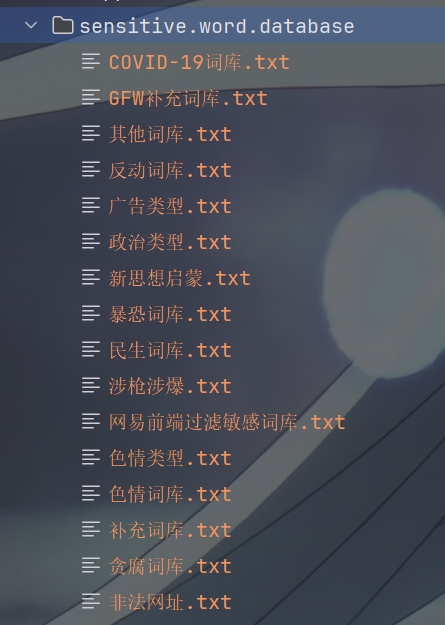
创建本地敏感词库

这个在网上自己找


创建 SensitiveUtil 敏感词库工具类

1
2
3
4
5
6
7
8
9
10
11
12
13
14
15
16
17
18
19
20
21
22
23
24
25
26
27
28
29
30
31
32
33
34
35
36
37
38
39
40
41
42
43
44
45
46
47
48
49
50
51
52
53
54
55
56
57
58
59
60
61
62
63
64
65
66
67
68
69
70
71
72
73
74
75
76
77
78
79
80
81
82
83
84
85
86
87
88
89
90
91
92
93
94
95
96
97
98
99
100
101
102
103
104
105
106
107
108
109
110
111
112
113
114
115
116
117
118
119
120
121
122
123
124
125
126
127
128
129
130
131
132
133
134
135
136
137
138
139
140
141
142
143
144
145
146
147
148
149
150
151
152
153
154
155
156
157
158
159
160
161
162
163
164
165
166
167
168
169
170
171
172
173
174
175
176
177
178
179
180
181
182
183
184
185
186
187
188
189
190
191
192
193
194
195
196
197
198
199
200
201
202
203
204
205
206
207
208
209
210
211
212
213
214
215
216
217
218
219
220
221
222
223
224
225
226
227
228
229
230
231
232
233
234
235
236
237
238
239
240
241
242
243
244
245
246
247
248
249
250
251
252
253
254
255
256
257
258
259
260
261
262
263
264
265
266
267
268
269
270
271
272
273
274
275
276
277
278
279
280
281
282
283
284
285
286
287
288
289
290
291
292
293
294
295
296
297
298
299
300
301
302
303
304
305
306
307
308
309
310
311
312
313
314
315
316
317
318
319
320
321
322
323
324
325
326
327
328
329
330
331
332
333
334
335
336
337
338
339
340
341
342
343
344
345
346
347
348
349
350
351
352
353
354
355
356
357
358
359
360
361
362
363
364
365
366
367
368
369
370
371
372
373
374
375
376
377
378
379
380
381
382
383
384
385
386
387
388
389
390
391
392
393
394
395
396
397
398
399
400
401
/**
* 敏感词校验工具类
* 支持多文件加载、并行加载
*/
@Slf4j
@Component
public class SensitiveUtil
{

/**
* 敏感词文件目录(支持通配符)
*/
private static final String SENSITIVE_WORD_PATTERN = "classpath:sensitive.word.database/*.txt";

/**
* 根节点
*/
private static final TrieNode ROOT_NODE = new TrieNode();

/**
* 敏感词总数
*/
private static final AtomicInteger WORD_COUNT = new AtomicInteger(0);

/**
* 敏感词与来源文件的映射关系
*/
private static final Map<String, String> WORD_SOURCE_MAP = new HashMap<>();

@PostConstruct
public void init() {
long startTime = System.currentTimeMillis();
log.info("开始加载敏感词库...");

try {
PathMatchingResourcePatternResolver resolver = new PathMatchingResourcePatternResolver();
Resource[] resources = resolver.getResources(SENSITIVE_WORD_PATTERN);

if (resources.length == 0) {
log.warn("未找到敏感词文件,请检查路径: {}", SENSITIVE_WORD_PATTERN);
return;
}

log.info("找到 {} 个敏感词文件", resources.length);

// 并行加载所有文件
Arrays.stream(resources)
.parallel()
.forEach(this::loadWordsFromResource);

long endTime = System.currentTimeMillis();
log.info("敏感词库加载完成!共加载 {} 个敏感词,耗时 {} ms",
WORD_COUNT.get(), endTime - startTime);

} catch (Exception e) {
log.error("加载敏感词文件失败", e);
}
}

/**
* 从资源文件加载敏感词
*/
private void loadWordsFromResource(Resource resource) {
int count = 0;
String filename = resource.getFilename();
try (BufferedReader reader = new BufferedReader(
new InputStreamReader(resource.getInputStream(), StandardCharsets.UTF_8))) {

String line;
while ((line = reader.readLine()) != null) {
String keyword = processLine(line);
if (keyword != null && !keyword.isEmpty()) {
addKeyword(keyword, filename);
count++;
}
}
log.debug("从文件 {} 加载了 {} 个敏感词", filename, count);
WORD_COUNT.addAndGet(count);

} catch (Exception e) {
log.error("加载敏感词文件失败: {}", filename, e);
}
}

/**
* 处理每一行,过滤空行
*/
private String processLine(String line) {
if (line == null) {
return null;
}

// 去除首尾空格
line = line.trim();

// 跳过空行
if (line.isEmpty()) {
return null;
}

return line;
}

/**
* 将一个敏感词添加到前缀树中(线程安全)
*
* @param keyword 敏感词
* @param sourceFile 来源文件名
*/
private synchronized void addKeyword(String keyword, String sourceFile) {
if (keyword == null || keyword.isEmpty()) {
return;
}

// 记录敏感词与来源文件的映射关系
WORD_SOURCE_MAP.put(keyword, sourceFile);

TrieNode tempNode = ROOT_NODE;
for (int i = 0; i < keyword.length(); i++) {
char c = keyword.charAt(i);
TrieNode subNode = tempNode.getSubNode(c);
if (subNode == null) {
// 初始化子节点
subNode = new TrieNode();
tempNode.addSubNode(c, subNode);
}
// 指向子节点,进入下一轮循环
tempNode = subNode;
// 设置结束标识
if (i == keyword.length() - 1) {
tempNode.setKeywordEnd(true);
}
}
}

/**
* 检测文本是否包含敏感词
*
* @param text 待检测的文本
* @return true-包含敏感词,false-不包含
*/
public static boolean containsSensitiveWords(String text) {
// 空文本直接返回false
if (StringUtil.isBlank(text)) {
return false;
}
// 指针1 - 当前Trie节点
TrieNode tempNode = ROOT_NODE;
// 指针2 - 检测起始位置
int begin = 0;
// 指针3 - 当前检测位置
int position = 0;
while (position < text.length()) {
char c = text.charAt(position);
// 跳过符号
if (isSymbol(c)) {
// 如果在根节点,移动起始位置
if (tempNode == ROOT_NODE) {
begin++;
}
position++;
continue;
}
// 检查下级节点
tempNode = tempNode.getSubNode(c);
if (tempNode == null) {
// 不是敏感词,从下一个位置重新开始检测
position = ++begin;
tempNode = ROOT_NODE;
} else if (tempNode.isKeywordEnd()) {
// 发现完整的敏感词,立即返回true
return true;
} else {
// 继续检查下一个字符
position++;
}
}
return false;
}

/**
* 查找文本中的所有敏感词
*
* @param text 待检测的文本
* @return 敏感词列表
*/
public static List<String> findSensitiveWords(String text) {
List<String> sensitiveWords = new ArrayList<>();
if (StringUtil.isBlank(text)) {
return sensitiveWords;
}

TrieNode tempNode = ROOT_NODE;
int begin = 0;
int position = 0;

while (position < text.length()) {
char c = text.charAt(position);

if (isSymbol(c)) {
if (tempNode == ROOT_NODE) {
begin++;
}
position++;
continue;
}

tempNode = tempNode.getSubNode(c);
if (tempNode == null) {
position = ++begin;
tempNode = ROOT_NODE;
} else if (tempNode.isKeywordEnd()) {
// 找到敏感词
String word = text.substring(begin, position + 1);
sensitiveWords.add(word);
// 继续查找下一个
position = ++begin;
tempNode = ROOT_NODE;
} else {
position++;
}
}
return sensitiveWords;
}

/**
* 查找文本中的所有敏感词及其来源文件
*
* @param text 待检测的文本
* @return 敏感词与来源文件的映射
*/
public static Map<String, String> findSensitiveWordsWithSource(String text) {
Map<String, String> result = new LinkedHashMap<>();
if (StringUtil.isBlank(text)) {
return result;
}

TrieNode tempNode = ROOT_NODE;
int begin = 0;
int position = 0;

while (position < text.length()) {
char c = text.charAt(position);

if (isSymbol(c)) {
if (tempNode == ROOT_NODE) {
begin++;
}
position++;
continue;
}

tempNode = tempNode.getSubNode(c);
if (tempNode == null) {
position = ++begin;
tempNode = ROOT_NODE;
} else if (tempNode.isKeywordEnd()) {
// 找到敏感词
String word = text.substring(begin, position + 1);
String sourceFile = WORD_SOURCE_MAP.getOrDefault(word, "未知来源");
result.put(word, sourceFile);
// 继续查找下一个
position = ++begin;
tempNode = ROOT_NODE;
} else {
position++;
}
}
return result;
}

/**
* 获取敏感词的来源文件
*
* @param word 敏感词
* @return 来源文件名
*/
public static String getWordSource(String word) {
return WORD_SOURCE_MAP.getOrDefault(word, "未知来源");
}

/**
* 替换文本中的敏感词
*
* @param text 待过滤的文本
* @param replacement 替换字符(如 *)
* @return 过滤后的文本
*/
public static String replaceSensitiveWords(String text, String replacement) {
if (StringUtil.isBlank(text)) {
return text;
}

StringBuilder result = new StringBuilder();
TrieNode tempNode = ROOT_NODE;
int begin = 0;
int position = 0;

while (position < text.length()) {
char c = text.charAt(position);

if (isSymbol(c)) {
if (tempNode == ROOT_NODE) {
result.append(c);
begin++;
}
position++;
continue;
}

tempNode = tempNode.getSubNode(c);
if (tempNode == null) {
result.append(text.charAt(begin));
position = ++begin;
tempNode = ROOT_NODE;
} else if (tempNode.isKeywordEnd()) {
// 替换敏感词
int length = position - begin + 1;
result.append(replacement.repeat(length));
position++;
begin = position;
tempNode = ROOT_NODE;
} else {
position++;
}
}

// 添加剩余字符
result.append(text.substring(begin));
return result.toString();
}

/**
* 获取已加载的敏感词数量
*/
public static int getWordCount() {
return WORD_COUNT.get();
}

/**
* 判断是否为符号
*
* @param c 字符
* @return 判断
*/
private static boolean isSymbol(Character c) {
// 0x2E80~0x9FFF 是东亚文字范围
return !isAsciiAlphanumeric(c) && (c < 0x2E80 || c > 0x9FFF);
}

public static boolean isAsciiAlpha(char ch) {
return isAsciiAlphaUpper(ch) || isAsciiAlphaLower(ch);
}

public static boolean isAsciiAlphaUpper(char ch) {
return ch >= 'A' && ch <= 'Z';
}

public static boolean isAsciiAlphaLower(char ch) {
return ch >= 'a' && ch <= 'z';
}

public static boolean isAsciiNumeric(char ch) {
return ch >= '0' && ch <= '9';
}

public static boolean isAsciiAlphanumeric(char ch) {
return isAsciiAlpha(ch) || isAsciiNumeric(ch);
}

/**
* 前缀树
*/
private static class TrieNode {

// 关键词结束标识
private boolean isKeywordEnd = false;

// 子节点
private final Map<Character, TrieNode> subNodes = new HashMap<>();

public boolean isKeywordEnd() {
return isKeywordEnd;
}

public void setKeywordEnd(boolean keywordEnd) {
isKeywordEnd = keywordEnd;
}

// 添加子节点
public void addSubNode(Character c, TrieNode node) {
subNodes.put(c, node);
}

// 获取子节点
public TrieNode getSubNode(Character c) {
return subNodes.get(c);
}

}
}

创建 AiPromptTemplateUtils 用于于ai对话的提示词模板

1
2
3
4
5
6
7
8
9
10
11
12
13
14
15
16
17
18
19
20
21
22
23
24
25
26
27
28
29
30
31
32
33
34
35
36
37
38
39
40
41
42
43
44
45
46
47
48
/**
* AI提示词模板工具类
* @author mengze
*/
public class AiPromptTemplateUtils {

/**
* 敏感词检测提示词模板
*/
private static final String SENSITIVE_CHECK_TEMPLATE =
"请严格判断以下内容是否包含敏感信息(暴力、色情、反动、诱导等)和包括不限于近期网络梗的违规敏感词,中文拼音首字母缩写和英文单词等敏感信息," +
"用JSON格式回答:{\"sensitive\":布尔值, \"confidence\":0-1的置信度}\n" +
"内容:%s";

/**
* 构建敏感词检测提示词
* @param content 待检测内容
* @return 完整的提示词
*/
public static String buildSensitiveCheckPrompt(String content) {
return String.format(SENSITIVE_CHECK_TEMPLATE, content);
}

/**
* 构建自定义检测提示词
* @param content 待检测内容
* @param customRules 自定义规则描述
* @return 完整的提示词
*/
public static String buildCustomCheckPrompt(String content, String customRules) {
String template = "请根据以下规则判断内容:%s\n" +
"用JSON格式回答:{\"sensitive\":布尔值, \"confidence\":0-1的置信度, \"reason\":\"原因\"}\n" +
"内容:%s";
return String.format(template, customRules, content);
}

/**
* 构建内容质量评估提示词
* @param content 待评估内容
* @return 完整的提示词
*/
public static String buildQualityCheckPrompt(String content) {
String template = "请评估以下内容的质量(是否为垃圾信息、广告、无意义内容等)," +
"用JSON格式回答:{\"isSpam\":布尔值, \"confidence\":0-1的置信度, \"category\":\"分类\"}\n" +
"内容:%s";
return String.format(template, content);
}
}

创建枚举 DetectionStatusEnum

1
2
3
4
5
6
7
8
9
10
11
12
13
14
15
16
17
18
19
20
21
22
23
24
25
26
27
28
29
30
31
32
33
34
35
36
/**
* 检测状态枚举
* @author mengze
*/
public enum DetectionStatusEnum {
/**
* 敏感内容
*/
SENSITIVE,

/**
* 内容安全
*/
CLEAR,

/**
* 建议云端检测
*/
SUGGEST_CLOUD_CHECK;

/**
* 是否应该拦截
* @return true-应该拦截,false-不拦截
*/
public boolean shouldBlock() {
return this == SENSITIVE;
}

/**
* 是否需要云端检测
* @return true-需要云端检测,false-不需要
*/
public boolean needsCloudCheck() {
return this == SUGGEST_CLOUD_CHECK;
}
}

再创建 ModelConfigDto

1
2
3
4
5
6
7
8
9
10
11
12
13
14
15
16
17
18
19
20
21
22
23
/**
* AI模型配置
* @author mengze
*/
@Data
@NoArgsConstructor
@AllArgsConstructor
public class ModelConfigDto {
/**
* 模型名称
*/
private String name;

/**
* 优先级
*/
private Integer priority;

/**
* 权重
*/
private Float weight;
}

再创建 AiChatService(ai 检测) 和 SensitiveUtilService(敏感词校验) 两个接口

1
2
3
4
5
6
7
8
9
10
11
12
/**
* AI聊天服务接口
* @author mengze
*/
public interface AiChatService {
/**
* AI检测敏感词
* @param word 待检测内容
* @return DetectionStatusEnum 检测状态
*/
DetectionStatusEnum aiCheckWord(String word);
}

1
2
3
4
5
6
7
8
9
10
11
12
13
/**
* @author mengze
*/
public interface SensitiveUtilService {

/**
* 内容校验敏感词
* @param content 内容
* @param email 评论者邮箱(用于判断是否为博主)
* @return 是否敏感
*/
Boolean checkSensitiveWords(String content, String email);
}

接下来实现两个接口 AiChatServiceImpl 和 SensitiveUtilServiceImpl

AiChatServiceImpl

1
2
3
4
5
6
7
8
9
10
11
12
13
14
15
16
17
18
19
20
21
22
23
24
25
26
27
28
29
30
31
32
33
34
35
36
37
38
39
40
41
42
43
44
45
46
47
48
49
50
51
52
53
54
55
56
57
58
59
60
61
62
63
64
65
66
67
68
69
70
71
72
73
74
75
76
77
78
79
80
81
82
83
84
85
86
87
88
89
90
91
92
93
94
95
96
97
98
99
100
101
102
103
104
105
106
107
108
109
110
111
112
113
114
115
116
117
118
119
120
121
122
123
124
125
126
127
128
129
130
131
132
133
134
135
136
137
138
139
140
141
142
143
144
145
146
147
148
149
150
151
152
153
154
155
156
157
158
159
160
161
162
163
164
165
/**
* @author mengze
*/
@Slf4j
@Service
public class AiChatServiceImpl implements AiChatService
{

@Resource
private DeepSeekClient deepSeekClient;

//需要调用的大大模型
private static final List<ModelConfigDto> MODEL_CONFIGS = Collections.unmodifiableList(Arrays.asList(
new ModelConfigDto("deepseek-v4-pro", 10, 1.0f),
new ModelConfigDto("deepseek-v4-flash", 8, 0.9f)
));

private static final ExecutorService MODEL_EXECUTOR = Executors.newCachedThreadPool(
new ThreadFactoryBuilder().setNameFormat("ai-detection-%d").setDaemon(true).build()
);


/**
* AI检测敏感词
* @param word 待检测内容
* @return DetectionStatus 检测状态
*/
@Override
public DetectionStatusEnum aiCheckWord(String word) {
if (StringUtils.isEmpty(word)) {
return DetectionStatusEnum.CLEAR;
}
// 短内容使用单模型快速检测
if (word.length() < 5) {
return checkWithSingleModel(word, MODEL_CONFIGS.get(1));
}
// 中长内容使用多模型检测
return checkWithOptimizedModels(word);
}

private DetectionStatusEnum checkWithOptimizedModels(String content) {
List<ModelConfigDto> sortedModels = MODEL_CONFIGS.stream()
.sorted(Comparator.comparingInt(ModelConfigDto::getPriority).reversed())
.collect(Collectors.toList());
// 创建并行任务列表
List<CompletableFuture<DetectionStatusEnum>> futures = sortedModels.stream()
.map(config -> CompletableFuture.supplyAsync(
() -> checkWithSingleModel(content, config),
MODEL_EXECUTOR
).exceptionally(e -> {
log.warn("模型检测异常: {}", e.getMessage());
return DetectionStatusEnum.SUGGEST_CLOUD_CHECK;
})).collect(Collectors.toList());
// 使用allOf等待所有任务完成(无论成功与否)
CompletableFuture<Void> allFutures = CompletableFuture.allOf(
futures.toArray(new CompletableFuture[0])
);
try {
// 设置总超时时间
allFutures.get(5, TimeUnit.SECONDS);
} catch (TimeoutException e) {
log.warn("部分模型检测未能在5秒内完成,继续处理已完成结果");
} catch (Exception e) {
log.error("多模型检测发生异常", e);
}
// 收集所有结果(包括已完成和异常的)
List<DetectionStatusEnum> results = futures.stream()
.map(future -> {
try {
// 未完成则返回默认
return future.getNow(DetectionStatusEnum.SUGGEST_CLOUD_CHECK);
} catch (Exception e) {
return DetectionStatusEnum.SUGGEST_CLOUD_CHECK;
}
}).collect(Collectors.toList());

// 综合评估策略
return evaluateConsensusResults(results);
}

/**
* 综合评估策略(升级版)
*/
private DetectionStatusEnum evaluateConsensusResults(List<DetectionStatusEnum> results) {
if (results.isEmpty()) {
return DetectionStatusEnum.SUGGEST_CLOUD_CHECK;
}
// 统计各状态数量
Map<DetectionStatusEnum, Long> countMap = results.stream()
.collect(Collectors.groupingBy(
status -> status,
Collectors.counting()
));
long sensitiveCount = countMap.getOrDefault(DetectionStatusEnum.SENSITIVE, 0L);
long clearCount = countMap.getOrDefault(DetectionStatusEnum.CLEAR, 0L);
long totalModels = results.size();
// 策略1:超过半数模型明确判定敏感
if (sensitiveCount > totalModels / 2) {
log.info("AI多模型判定结果为:超过半数模型明确判定敏感");
return DetectionStatusEnum.SENSITIVE;
}
// 策略2:超过70%模型明确判定非敏感
if (clearCount > totalModels * 0.7) {
log.info("AI多模型判定结果为:超过70%模型明确判定非敏感");
return DetectionStatusEnum.CLEAR;
}
// 策略3:存在敏感判定且总占比超过30%
if (sensitiveCount > 0 && (sensitiveCount + clearCount) * 0.3 < sensitiveCount) {
log.info("AI多模型判定结果为:存在敏感判定且总占比超过30%");
return DetectionStatusEnum.SENSITIVE;
}
// 其他情况建议云校验
return DetectionStatusEnum.SUGGEST_CLOUD_CHECK;
}

private DetectionStatusEnum checkWithSingleModel(String content, ModelConfigDto config) {
try {
long startTime = System.currentTimeMillis();
String prompt = AiPromptTemplateUtils.buildSensitiveCheckPrompt(content);
ChatCompletionRequest request = ChatCompletionRequest.builder()
.addUserMessage(prompt)
.model(config.getName())
.stream(false)
.temperature(0.0)
.maxCompletionTokens(30)
.reasoningEffort("low") // 表示低推理强度,不是深度思考模式
.build();
// 带超时的请求
CompletableFuture<ChatCompletionResponse> future = CompletableFuture.supplyAsync(
() -> deepSeekClient.chatCompletion(request).execute()
);
ChatCompletionResponse response = future.get(10000, TimeUnit.MILLISECONDS);
if (response == null || response.choices() == null || response.choices().isEmpty()) {
log.warn("模型 {} 返回空响应", config.getName());
return DetectionStatusEnum.SUGGEST_CLOUD_CHECK;
}
String answer = response.choices().get(0).message().content().trim()
.replace("\uFEFF", "")
.replaceAll("^```json|```$", "");
try {
JsonNode json = new ObjectMapper()
.configure(DeserializationFeature.FAIL_ON_UNKNOWN_PROPERTIES, false)
.readTree(answer);
boolean sensitive = json.path("sensitive").asBoolean();
float confidence = (float) json.path("confidence").asDouble(0.5);
log.info("模型 {} 检测结果: {}, 置信度: {}, 检测耗时: {}ms", config.getName(), sensitive, confidence, System.currentTimeMillis() - startTime);
// 根据置信度确定最终状态
if (sensitive) {
return confidence >= 0.8 ? DetectionStatusEnum.SENSITIVE : DetectionStatusEnum.SUGGEST_CLOUD_CHECK;
} else {
return confidence >= 0.7 ? DetectionStatusEnum.CLEAR : DetectionStatusEnum.SUGGEST_CLOUD_CHECK;
}
} catch (Exception e) {
log.warn("解析模型 {} 响应失败: {}", config.getName(), answer);
return DetectionStatusEnum.SUGGEST_CLOUD_CHECK;
}
} catch (TimeoutException e) {
log.warn("模型 {} 检测超时", config.getName());
return DetectionStatusEnum.SUGGEST_CLOUD_CHECK;
} catch (Exception e) {
log.error("模型 {} 检测异常: {}", config.getName(), e.getMessage());
return DetectionStatusEnum.SUGGEST_CLOUD_CHECK;
}
}
}

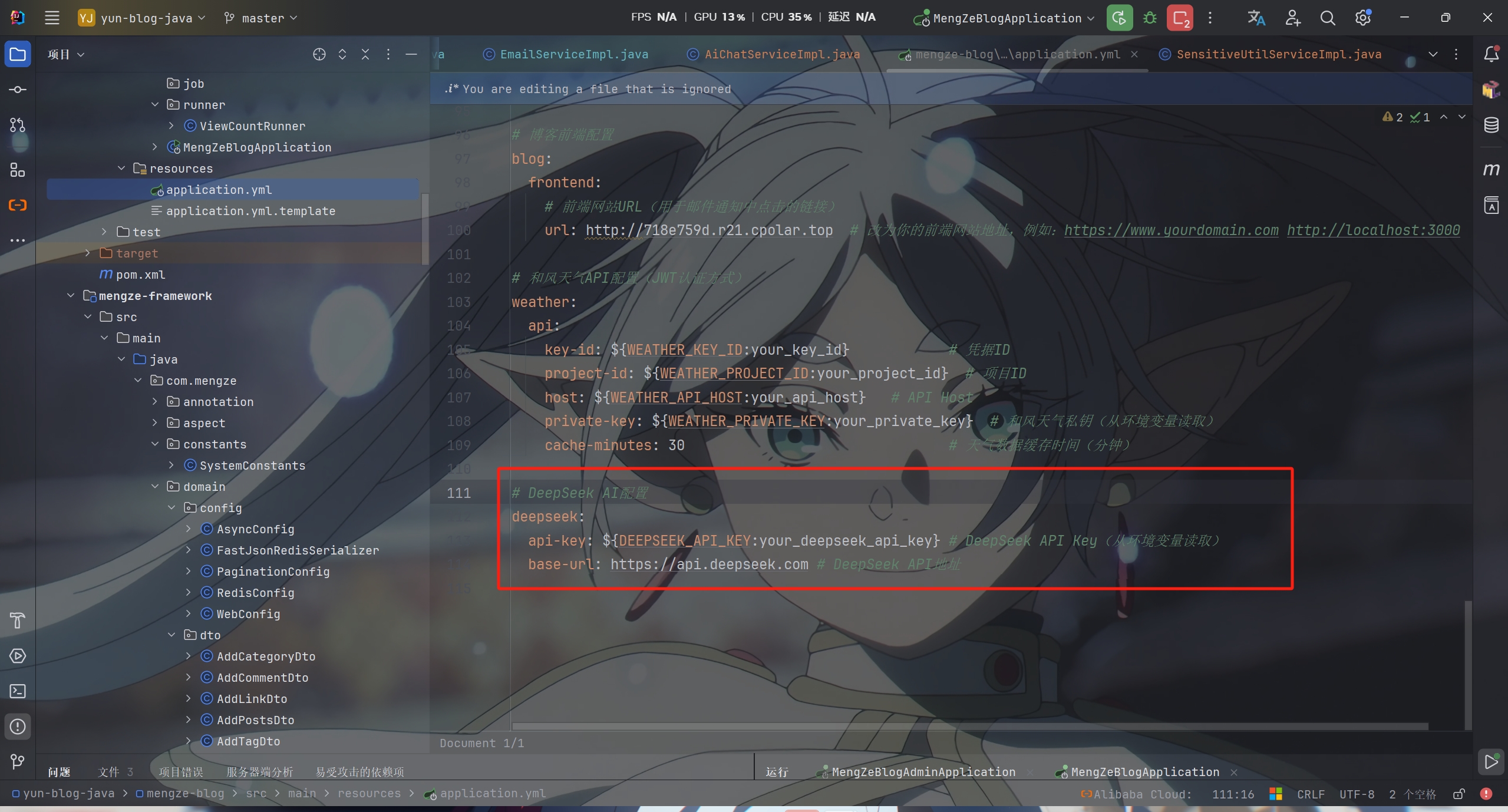
需要注意的是这里涉及到大模型api的调用,需要去注册一个大模型账号并获取调用api的key(我这里调用的是deepseek)

获取key之后在 application.yml 中配置就行了


SensitiveUtilServiceImpl

1
2
3
4
5
6
7
8
9
10
11
12
13
14
15
16
17
18
19
20
21
22
23
24
25
26
27
28
29
30
31
32
33
34
35
36
37
38
39
40
41
42
43
44
45
46
47
48
49
50
51
52
53
54
55
56
57
58
59
60
61
62
/**
* @author mengze
*/
@Slf4j
@Service
public class SensitiveUtilServiceImpl implements SensitiveUtilService
{

@Resource
private AiChatService aiChatService;

/**
* 内容校验敏感词
*
* @param content 内容
* @param email 评论者邮箱(用于判断是否为博主)
* @return 是否敏感
*/
@Override
public Boolean checkSensitiveWords(String content, String email) {
if (StringUtils.isEmpty(content)) {
return false;
}

// 判断是否为博主,博主评论跳过敏感词检测
if (SecurityUtils.isLogin() && SecurityUtils.isAdmin()) {
log.info("博主评论(已登录),跳过敏感词检测");
return false;
}

if (StringUtils.isNotEmpty(email) && email.equalsIgnoreCase(SystemConstants.BLOGGER_EMAIL)) {
log.info("博主评论(未登录),跳过敏感词检测");
return false;
}

//1.本地词库检测
if (SensitiveUtil.containsSensitiveWords(content)) {
// 获取检测到的具体敏感词及其来源文件
java.util.Map<String, String> localSensitiveWordsWithSource = SensitiveUtil.findSensitiveWordsWithSource(content);
log.info("本地词库检测为敏感词,检测到的敏感词及来源: {}", localSensitiveWordsWithSource);
return true;
}
log.info("本地词库检测无敏感词 >>>>> 进入开源词库检测");
//2.开源词库检测
if (SensitiveWordHelper.contains(content)) {
// 获取开源词库检测到的具体敏感词
java.util.List<String> openSourceSensitiveWords = SensitiveWordHelper.findAll(content);
log.info("开源词库检测为敏感词,检测到的敏感词: {}", openSourceSensitiveWords);
return true;
}
log.info("开源词库检测无敏感词 >>>>> 进入多ai并行检测");
//3.多AI并行检测
DetectionStatusEnum aiStatus = aiChatService.aiCheckWord(content);
if (aiStatus.shouldBlock()) {
log.info("多AI并行检测为敏感词,内容: {}", content);
return true;
}
log.info("多AI并行检测无敏感词 >>>>> 可以评论");
return false;
}

}

准备好这些工具之后就可以在前台系统的 addComment 方法里调用了

1
2
3
4
5
6
7
8
9
10
11
12
13
14
15
16
17
18
19
20
21
22
23
24
25
26
27
28
29
30
31
32
33
34
35
36
37
38
39
40
41
42
43
44
45
46
47
48
49
50
51
52
53
54
55
56
57
58
59
60
61
62
63
64
65
66
67
68
69
70
71
72
73
74
75
76
77
78
79
80
81
82
83
84
85
86
87
88
89
90
91
92
93
94
95
96
97
98
99
100
101
102
103
104
105
106
107
108
109
110
111
112
113
114
115
116
117
118
//添加评论
@Override
public ResponseResult addComment(AddCommentDto addCommentDto)
{
//校验评论内容
if (!StringUtils.hasText(addCommentDto.getContent())) {
return ResponseResult.errorResult(AppHttpCodeEnum.CONTENT_NOT_NULL);
}

String type = addCommentDto.getType();

//如果是文章评论,需要校验文章是否允许评论
if (SystemConstants.COMMENT_TYPE_ARTICLE.equals(type)) {
Long articleId = addCommentDto.getArticleId();
if (articleId == null) {
return ResponseResult.errorResult(AppHttpCodeEnum.SYSTEM_ERROR.getCode(), "文章ID不能为空");
}

//查询文章信息
Article article = articleService.getById(articleId);
if (article == null) {
return ResponseResult.errorResult(AppHttpCodeEnum.SYSTEM_ERROR.getCode(), "文章不存在");
}

//检查文章是否允许评论
if (!SystemConstants.ALLOW_COMMENT.equals(article.getIsComment())) {
return ResponseResult.errorResult(AppHttpCodeEnum.SYSTEM_ERROR.getCode(), "该文章不允许评论");
}
}

Comment comment = BeanCopyUtils.copyBean(addCommentDto, Comment.class);

//处理 rootId 默认值
if (comment.getRootId() == null) {
comment.setRootId(-1L);
}

//根据评论类型进行权限校验和用户信息设置
if (SystemConstants.COMMENT_TYPE_ARTICLE.equals(type) || SystemConstants.COMMENT_TYPE_LINK.equals(type))
{
//文章评论和友链评论需要登录
if (!SecurityUtils.isLogin()) {
return ResponseResult.errorResult(AppHttpCodeEnum.NEED_LOGIN);
}
LoginUser loginUser = SecurityUtils.getLoginUser();
SysUser sysUser = loginUser.getSysUser();
comment.setUserId(sysUser.getId());
comment.setNickname(sysUser.getNickname());
comment.setEmail(sysUser.getEmail());
} else if (SystemConstants.COMMENT_TYPE_MESSAGE.equals(type)) {
//留言板评论可以不登录
if (SecurityUtils.isLogin()) {
//已登录用户使用登录信息
LoginUser loginUser = SecurityUtils.getLoginUser();
SysUser sysUser = loginUser.getSysUser();
comment.setUserId(sysUser.getId());
comment.setNickname(sysUser.getNickname());
comment.setEmail(sysUser.getEmail());
} else {
//未登录用户需要填写昵称和邮箱
if (!StringUtils.hasText(addCommentDto.getNickname())) {
return ResponseResult.errorResult(AppHttpCodeEnum.NICKNAME_NOT_NULL);
}
if (!StringUtils.hasText(addCommentDto.getEmail())) {
return ResponseResult.errorResult(AppHttpCodeEnum.EMAIL_NOT_NULL);
}
}
}

//根据用户信息获取头像
if (comment.getUserId() != null) {
//已登录用户,使用用户表中的最新头像
SysUser sysUser = sysUserMapper.selectById(comment.getUserId());
if (sysUser != null && StringUtils.hasText(sysUser.getAvatar())) {
comment.setAvatar(sysUser.getAvatar());
} else {
//用户表中没有头像,根据邮箱生成(使用评论专用头像)
comment.setAvatar(GravatarUtils.getCommentPreviewAvatarUrl(comment.getEmail()));
}
} else {
//未登录用户,根据邮箱生成(使用评论专用头像)
comment.setAvatar(GravatarUtils.getCommentPreviewAvatarUrl(comment.getEmail()));
}

//敏感词检测
boolean isSensitive = sensitiveUtilService.checkSensitiveWords(comment.getContent(), comment.getEmail());

//设置默认值
comment.setLikeCount(SystemConstants.DEFAULT_COMMENT_LIKES);

//根据敏感词检测结果设置评论状态
if (isSensitive) {
//检测到敏感词,设置为待审核状态
comment.setStatus(SystemConstants.COMMENT_STATUS_PENDING_REVIEW);
} else {
//未检测到敏感词,设置为正常状态
comment.setStatus(SystemConstants.COMMENT_STATUS_NORMAL);
}

comment.setDelFlag(SystemConstants.COMMENT_STATUS_NORMAL);
comment.setCreateTime(new Date());

save(comment);

//如果检测到敏感词,发送敏感词相关的邮件通知
if (isSensitive) {
//发送敏感词检测邮件通知(包括给用户和博主)
emailService.sendSensitiveWordNotification(comment);

//返回提示信息
return ResponseResult.errorResult(AppHttpCodeEnum.COMMENT_SENSITIVE_PENDING_REVIEW);
}

//未检测到敏感词,发送正常的评论通知邮件
emailService.sendCommentNotificationByEmail(comment);

return ResponseResult.okResult();
}

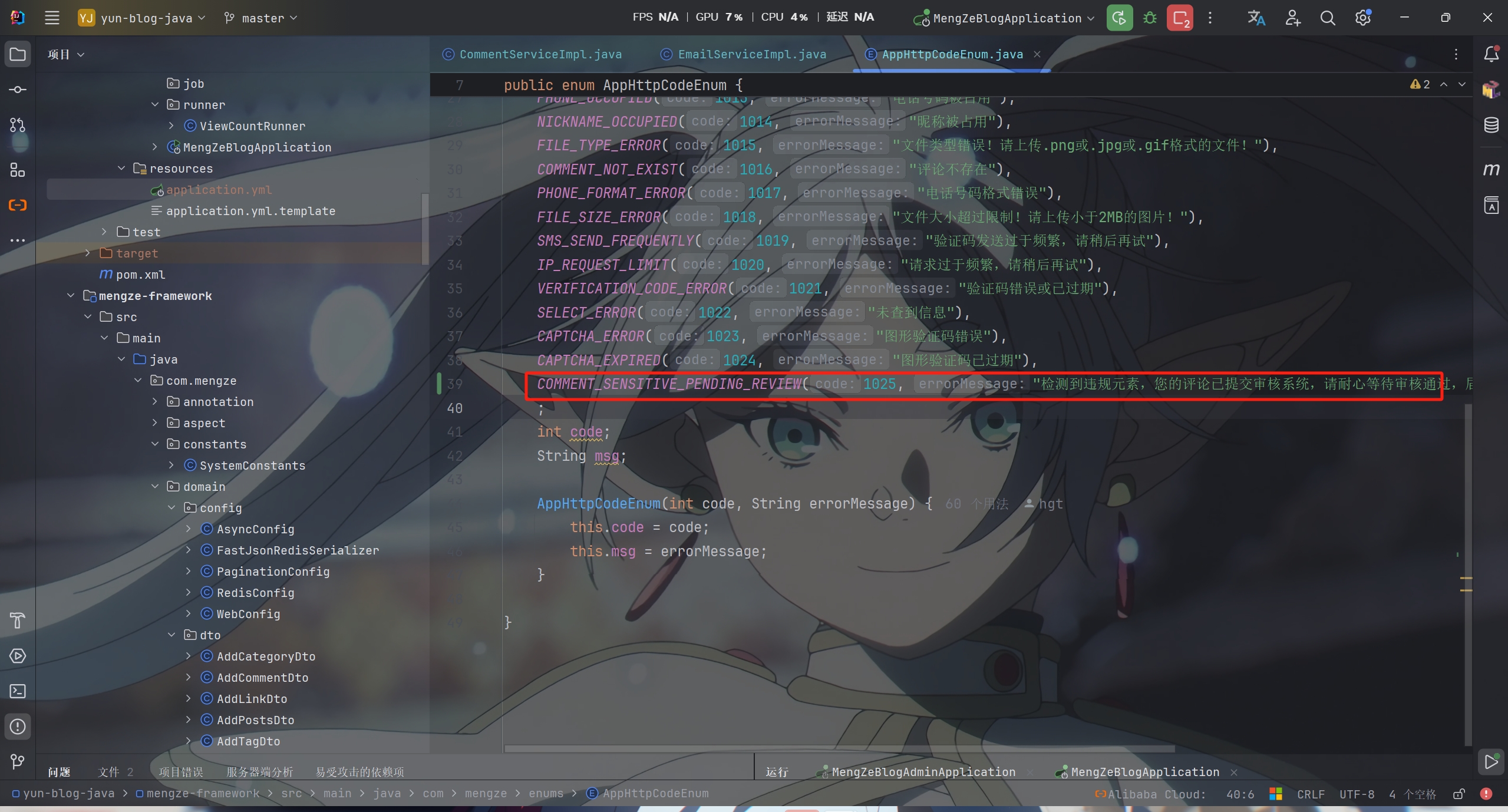
要创建一个枚举来提醒用户


其中如果检测到敏感词会给用户和管理员发送邮箱通知

由于 EmailServiceImpl 中发送邮件的一些方法在后面管理员审核通过与否还要添加两个邮件

这里就不先展示上面涉及到的两个 EmailServiceImpl 中的方法

等后面对 EmailServiceImpl 进行功能升级完成后,再将涉及到更新的代码进行发布


PS:该系列只做为作者学习开发项目做的笔记用

不一定符合读者来学习,仅供参考


预告

后续会记录博客的开发过程

每次学习会做一份笔记来进行发表

“一花一世界,一叶一菩提”


版权所有 © 2026 云梦泽
欢迎访问我的个人网站:https://hgt12.github.io/


『博客开发日记』之评论系统添加对敏感词的检测功能
http://example.com/2026/05/04/『博客开发日记』之评论系统添加对敏感词的检测功能/
作者
云梦泽
发布于
2026年5月4日
更新于
2026年5月4日
许可协议