本文最后更新于 2026年5月22日 下午
获取邮箱验证码接口的实现
获取邮箱验证码接口的需求
这是后台用户需要换绑邮箱时进行发送验证码操作的
校验邮箱不能为空
校验邮箱格式
记录IP地址,防止大量请求发送验证码
获得验证码并存入redis
代码实现
在 AdminUserController 中
1
2
3
4
5
6
7
8
| @PostMapping("/email/code")
@SystemLog(businessName = "获取邮箱验证码接口")
@ApiOperation(value = "获取邮箱验证码接口", notes = "用户更换或绑定邮箱时获取邮箱验证码", response = String.class)
@ApiImplicitParam(name = "email", value = "邮箱地址", dataType = "String", paramType = "query", required = true)
public ResponseResult getEmailCode(@RequestParam String email)
{
return adminUserService.getEmailCode(email);
}
|
在 ContentTypeValidationFilter 中给接口放行
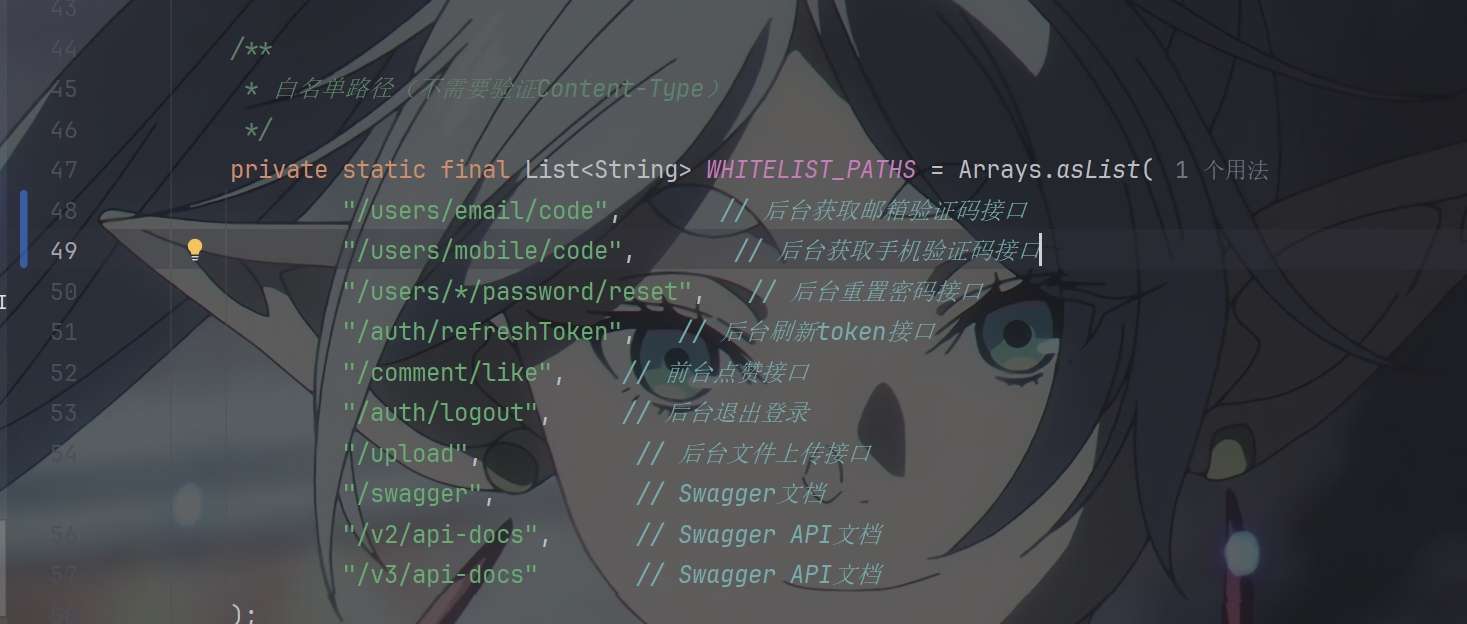
在 EmailServiceImpl 中添加方法
由于发送邮箱验证码之前写过集成的邮件
所以直接写方法传参就行了
1
2
3
4
5
6
7
8
9
10
11
12
13
14
15
16
17
18
19
20
21
22
23
24
25
26
27
28
29
|
@Async("asyncExecutor")
public void sendVerificationCodeByUpdateOrBind(String to, String code)
{
sendVerificationEmail(to, code, "邮箱绑定/更换", "您正在进行邮箱绑定或更换操作,请使用以下验证码完成验证。");
}
private String getThemeColor(String scene)
{
return switch (scene) {
case "登录" -> "#30a9de";
case "注册" -> "#52c41a";
case "重置密码" -> "#ff6b6b";
case "邮箱绑定/更换" -> "#de6530";
default -> "#30a9de";
};
}
private String getGreeting(String scene)
{
return switch (scene) {
case "注册" -> "⌯ᵔᗜᵔ⌯ಣ 欢迎加入!";
case "重置密码" -> "密码重置";
case "邮箱绑定/更换" -> "邮箱绑定/更换";
default -> " (๓´˘`๓) 您好!";
};
}
|
添加枚举
1
| EMAIL_FORMAT_ERROR(1025, "邮箱格式错误"),
|
在 AdminUserServiceImpl 中
1
2
3
4
5
6
7
8
9
10
11
12
13
14
15
16
17
18
19
20
21
22
23
24
25
26
27
28
29
30
31
32
33
34
35
36
37
38
|
@Override
public ResponseResult getEmailCode(String email)
{
if (!StringUtils.hasText(email)) {
return ResponseResult.errorResult(AppHttpCodeEnum.SYSTEM_ERROR, "手机号不能为空");
}
email = email.trim();
if (!email.matches("^[A-Za-z0-9+_.-]+@[A-Za-z0-9.-]+$")) {
return ResponseResult.errorResult(AppHttpCodeEnum.EMAIL_FORMAT_ERROR);
}
String clientIp = getClientIp();
ResponseResult limitResult = checkCodeLimit(email, clientIp);
if (limitResult != null) {
return limitResult;
}
String code = generateCode();
String redisKey = saveCodeToRedis(email, code, clientIp);
try {
emailServiceImpl.sendVerificationCodeByUpdateOrBind(email, code);
} catch (Exception e) {
redisCache.deleteObject(redisKey);
redisCache.deleteObject(String.format("admin:send:time:%s", email));
log.error("发送邮箱验证码失败, email={}, error={}", email, e.getMessage(), e);
return ResponseResult.errorResult(AppHttpCodeEnum.SYSTEM_ERROR, "验证码发送失败,请稍后重试");
}
return ResponseResult.okResult();
}
|

PS:该系列只做为作者学习开发项目做的笔记用
不一定符合读者来学习,仅供参考
预告
后续会记录博客的开发过程
每次学习会做一份笔记来进行发表
“一花一世界,一叶一菩提”
版权所有 © 2026 云梦泽
欢迎访问我的个人网站:https://hgt12.github.io/