『博客开发日记-后台』之获取通知列表接口的实现

本文最后更新于 2026年5月27日 晚上

获取通知列表接口的实现


获取通知列表接口的需求

获取当前登录用户ID 用于过滤该用户可见的通知

根据通知标题模糊搜索

根据当前用户过滤可见通知:

targetType=1 表示全体可见

targetType=2 时,通过 targetUserIds 判断是否包含当前用户ID

按id顺序排序

分页查询

查询本页通知的 publisherId再批量查询发布人信息

把发布人名称收集到返回结果中

查询当前用户对这些通知的阅读状态

普通用户只能看到全体和自己的通知,管理员可以看到所有通知


代码实现

前期准备

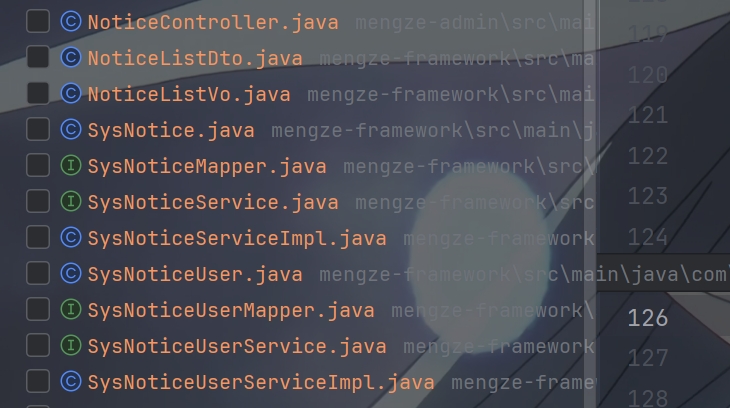
用 EasyCode 插件生成需要的文件


在 NoticeController 中添加接口

1
2
3
4
5
6
7
8
9
10
11
12
13
14
15
16
17
18
19
20
21
22
23
24
/**
* 通知相关接口
*/
@RestController
@RequestMapping("/notices")
@Api(tags = "通知", description = "通知相关接口")
public class NoticeController
{
@Autowired
private SysNoticeService sysNoticeService;

@GetMapping
@PreAuthorize("@ps.hasPermission('sys:notice:query')")
@SystemLog(businessName = "获取通知列表接口")
@ApiOperation(value = "获取通知列表接口", notes = "分页查询通知列表", response = PageVo.class)
@ApiImplicitParams({
@ApiImplicitParam(name = "pageNum", value = "页号", dataType = "int", paramType = "query"),
@ApiImplicitParam(name = "pageSize", value = "每页数量", dataType = "int", paramType = "query")
})
public ResponseResult<PageVo> getNoticeList(Integer pageNum, Integer pageSize, @Valid NoticeListDto noticeListDto)
{
return sysNoticeService.getNoticeList(pageNum, pageSize, noticeListDto);
}
}

创建 NoticeListVo

1
2
3
4
5
6
7
8
9
10
11
12
13
14
15
16
17
18
19
20
21
22
23
24
25
26
27
28
29
30
31
32
33
34
35
36
37
38
39
40
41
42
43
44
45
46
47
48
49
50
51
/**
* 通知Vo
*/
@Data
@AllArgsConstructor
@NoArgsConstructor
@Accessors(chain = true)
@ApiModel(description = "通知列表响应对象")
public class NoticeListVo
{
@ApiModelProperty(value = "通知id", example = "6")
private Long id;

@ApiModelProperty(value = "通知标题", example = "这里是标题")
private String title;

@ApiModelProperty(value = "通知内容", example = "这里是内容")
private String content;

@ApiModelProperty(value = "通知类型(关联字典编码:notice_type)", example = "系统维护")
private Integer type;

@ApiModelProperty(value = "通知等级(字典code:notice_level)", example = "M")
private String level;

@ApiModelProperty(value = "状态(0: 未发布, 1: 已发布, 2: 已撤回)", example = "0")
private String status;

@TableField(exist = false)
@ApiModelProperty(value = "读取状态(0: 未读, 1: 已读)", example = "0")
private String isRead;

@ApiModelProperty(value = "目标类型(1: 全体, 2: 指定)", example = "1")
private String targetType;

@ApiModelProperty(value = "发布人名字", example = "云梦泽")
private String publisherName;

//创建时间
@TableField(fill = FieldFill.INSERT)
@ApiModelProperty(value = "创建时间", example = "2024-01-01 12:00:00")
private Date createTime;

@TableField(fill = FieldFill.INSERT_UPDATE)
@ApiModelProperty(value = "发布时间", example = "2024-01-01 12:00:00")
private Date publishTime;

@TableField(fill = FieldFill.INSERT_UPDATE)
@ApiModelProperty(value = "撤回时间", example = "2024-01-02 12:00:00")
private Date revokeTime;
}

创建 NoticeListDto

1
2
3
4
5
6
7
8
9
10
11
12
13
14
15
16
17
18
19
20
/**
* 通知列表请求DTO
*/
@Data
@AllArgsConstructor
@NoArgsConstructor
@ApiModel(description = "通知列表请求对象")
public class NoticeListDto
{
@Pattern(regexp = "^$|^[012]$", message = "状态只能为0、1或2")
@ApiModelProperty(value = "发布状态(0-草稿,1-已发布,2-已撤回)", example = "0")
private String status;

@Pattern(regexp = "^$|^[01]$", message = "状态只能为0或1")
@ApiModelProperty(value = "是否已读(0-未读,1-已读)", example = "0")
private String isRead;

@ApiModelProperty(value = "通知标题关键字", example = "通知")
private String title;
}

创建常量

1
2
3
4
5
6
7
8
9
10
11
12
/**
* 通知未读
*/
public static final String NOTICE_NOT_READ = "0";
/**
* 目标类型:全体成员
*/
public static final String TARGET_TYPE_IS_ALL = "1";
/**
* 通知状态:已发布
*/
public static final String NOTICE_STATUS_PUBLISHED = "1";

在 SysNoticeServiceImpl 中

1
2
3
4
5
6
7
8
9
10
11
12
13
14
15
16
17
18
19
20
21
22
23
24
25
26
27
28
29
30
31
32
33
34
35
36
37
38
39
40
41
42
43
44
45
46
47
48
49
50
51
52
53
54
55
56
57
58
59
60
61
62
63
64
65
66
67
68
69
70
71
72
73
74
75
76
77
78
79
80
81
82
83
84
85
86
87
88
89
90
91
92
93
94
95
@Autowired
private SysNoticeUserService sysNoticeUserService;

@Autowired
private SysUserService sysUserService;

//查询通知列表
@Override
public ResponseResult<PageVo> getNoticeList(Integer pageNum, Integer pageSize, NoticeListDto noticeListDto)
{
//获取当前登录用户ID和角色信息
Long userId = SecurityUtils.getUserId();
boolean isAdmin = SecurityUtils.isAdmin();

//构建查询条件
LambdaQueryWrapper<SysNotice> queryWrapper = new LambdaQueryWrapper<>();

//根据通知标题模糊搜索
if (noticeListDto != null && StringUtils.hasText(noticeListDto.getTitle())) {
queryWrapper.like(SysNotice::getTitle, noticeListDto.getTitle());
}

//管理员可按前端传入状态筛选,普通用户仅能查看已发布通知
if (isAdmin) {
if (noticeListDto != null && StringUtils.hasText(noticeListDto.getStatus())) {
queryWrapper.eq(SysNotice::getStatus, noticeListDto.getStatus());
}
} else {
queryWrapper.eq(SysNotice::getStatus, SystemConstants.NOTICE_STATUS_PUBLISHED);
}

//管理员可查看所有通知,普通用户只能查看全体通知和自己的通知
if (!isAdmin) {
queryWrapper.and(wrapper -> wrapper.eq(SysNotice::getTargetType, SystemConstants.TARGET_TYPE_IS_ALL)
.or()
.apply("concat(',', target_user_ids, ',') like {0}", "%," + userId + ",%"));
}

//按id顺序排序
queryWrapper.orderByAsc(SysNotice::getId);

//分页查询
Page<SysNotice> page = new Page<>(pageNum, pageSize);
this.page(page, queryWrapper);

List<SysNotice> noticeList = page.getRecords();

//封装查询结果为Vo返回
List<NoticeListVo> noticeListVos = BeanCopyUtils.copyBeanList(noticeList, NoticeListVo.class);

//查询本页通知的 publisherId再批量查询发布人信息
List<Long> publisherIds = noticeList.stream()
.map(SysNotice::getPublisherId)
.filter(Objects::nonNull)
.distinct()
.collect(Collectors.toList());

Map<Long, String> publisherNameMap = new HashMap<>();
if (!publisherIds.isEmpty()) {
List<SysUser> publisherList = sysUserService.listByIds(publisherIds);
publisherNameMap = publisherList.stream()
.collect(Collectors.toMap(SysUser::getId, SysUser::getNickname, (oldVal, newVal) -> oldVal));
}

//把发布人名称回填到返回结果中
for (int i = 0; i < noticeList.size(); i++) {
SysNotice notice = noticeList.get(i);
NoticeListVo noticeListVo = noticeListVos.get(i);
noticeListVo.setPublisherName(publisherNameMap.get(notice.getPublisherId()));
}

//默认都设置为未读
for (NoticeListVo noticeListVo : noticeListVos) {
noticeListVo.setIsRead(SystemConstants.NOTICE_NOT_READ);
}

//如果当前用户已登录,再查询并回填阅读状态
if (userId != null && !noticeList.isEmpty()) {
List<Long> noticeIds = noticeList.stream().map(SysNotice::getId).collect(Collectors.toList());
List<SysNoticeUser> noticeUserList = sysNoticeUserService.list(new LambdaQueryWrapper<SysNoticeUser>()
.eq(SysNoticeUser::getUserId, userId)
.in(SysNoticeUser::getNoticeId, noticeIds));

Map<Long, String> noticeReadMap = noticeUserList.stream()
.collect(Collectors.toMap(SysNoticeUser::getNoticeId, SysNoticeUser::getIsRead, (oldVal, newVal) -> oldVal));

for (NoticeListVo noticeListVo : noticeListVos) {
noticeListVo.setIsRead(noticeReadMap.getOrDefault(noticeListVo.getId(), SystemConstants.NOTICE_NOT_READ));
}
}

PageVo pageVo = new PageVo(noticeListVos, page.getTotal());

return ResponseResult.okResult(pageVo);
}


PS:该系列只做为作者学习开发项目做的笔记用

不一定符合读者来学习,仅供参考


预告

后续会记录博客的开发过程

每次学习会做一份笔记来进行发表

“一花一世界,一叶一菩提”


版权所有 © 2026 云梦泽
欢迎访问我的个人网站:https://hgt12.github.io/


『博客开发日记-后台』之获取通知列表接口的实现
http://example.com/2026/05/27/『博客开发日记-后台』之获取通知列表接口的实现/
作者
云梦泽
发布于
2026年5月27日
更新于
2026年5月27日
许可协议